To get the best quality prints of your drone photos, make certain your images are high-resolution (at least 300 DPI) and well-composed, with balanced aerial elements. Choose print materials like glossy or metal for vibrant colors, or matte for a softer look. Consider print size; larger formats require sharper images. Proper framing or mounting enhances the final presentation. Keep these tips in mind to create stunning prints—continue for more insights on perfecting your drone photography prints.
Key Takeaways
- Use high-resolution drone photos (at least 300 DPI) to ensure clarity in large prints.
- Assess and enhance aerial composition, cropping, and framing to highlight main subjects.
- Choose print materials like glossy, matte, canvas, or metal based on desired aesthetic and durability.
- Match print size with image resolution to prevent pixelation and ensure optimal visual impact.
- Properly frame or mount the print to complement material and preserve quality over time.

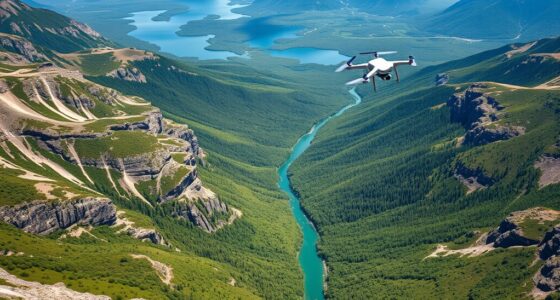
Have you ever wondered how to turn stunning drone photos into tangible keepsakes? When you capture those breathtaking aerial shots, the next step is to ensure they look just as impressive on paper as they do on your screen. The key lies in understanding aerial composition and selecting the right print material choices. Aerial composition is vital because it determines how your photo’s elements come together to create a balanced, engaging image. Before printing, inspect your shot for the overall layout, ensuring the main subjects are well-placed and the scene is compelling. This careful assessment helps you choose the best crop or framing to highlight the photo’s strengths, making your print more impactful. Additionally, paying attention to aerial perspective can enhance the depth and visual interest of your images, contributing to a more captivating final print.
Once you’ve perfected your composition, it’s time to think about print material choices. Not all surfaces are created equal, and the material you choose can greatly influence the final look. For instance, glossy paper enhances color vibrancy and adds a sleek shine, making your landscapes pop with vivid detail. Matte finishes, on the other hand, reduce glare and provide a softer, more subdued aesthetic, perfect for more artistic or subtle images. Canvas prints bring a textured, gallery-like feel to your drone photos, adding depth and a tactile quality that makes your aerial shots appear more like fine art. If you want a durable, weather-resistant option, metal prints are excellent—they offer vibrant colors and a modern, sleek appearance that stands the test of time.
Choose between glossy, matte, canvas, or metal finishes to enhance your drone photo prints.
Consider the size of your print as well. Larger formats are eye-catching and ideal for prominent display spaces, but they also demand high-resolution images to maintain clarity. When preparing your photo for print, always check its resolution—aim for at least 300 DPI (dots per inch)—to avoid pixelation or blurriness. Also, think about the framing or mounting options that will complement your chosen material. For example, a metal print might look stunning without a frame, while a canvas often benefits from a ready-to-hang frame that enhances its aesthetic appeal.
In the end, transforming your drone photos into beautiful prints involves more than just selecting a high-resolution image. It’s about understanding aerial composition to showcase your shot’s best features and choosing the right print material choices that suit your style and display needs. With a little planning and attention to detail, you can create striking, high-quality prints that preserve your aerial adventures for years to come.
Frequently Asked Questions
What Are the Best Printers for High-Resolution Drone Photos?
You should consider high-quality inkjet printers like Canon imagePROGRAF, Epson SureColor, or HP DesignJet for drone photos. These printers offer excellent resolution and color accuracy. Make sure to calibrate your printer regularly for consistent results, and choose printers with ink that boasts long longevity to preserve your vibrant images. Proper calibration and ink longevity are key to achieving the best high-resolution drone photo prints.
How Does Lighting Affect Drone Photo Print Quality?
Lighting conditions are the paintbrushes that color your drone photo’s final masterpiece, so poor lighting can dull its vibrancy. Bright, even light highlights details, while harsh shadows or low light can muddy the image. Use photo editing techniques to balance exposure and contrast, ensuring your print captures the scene’s true essence. Proper lighting makes your drone photos pop, transforming them into stunning wall art.
Can Drone Photos Be Printed on Canvas or Textured Paper?
Yes, you can print drone photos on canvas or textured paper. Canvas printing adds a professional, artistic touch, perfect for showcasing aerial shots. Textured paper gives your prints a unique feel, enhancing details and depth. To get the best results, guarantee your drone photo has high resolution and vibrant colors. Use a professional printing service experienced in these materials for sharp, durable, and stunning prints that truly capture your aerial view.
What Color Profiles Should I Use for Accurate Prints?
You should use the Adobe RGB or sRGB color profiles for accurate prints, depending on your printer and paper type. Start with proper color calibration of your monitor to ensure colors are true to life. Employ monitor profiling tools to maintain consistency, and always convert your images to the chosen color profile before printing. This process guarantees your drone photos reflect the vivid details and hues you see on screen.
How to Prevent Pixelation When Enlarging Drone Images?
Think of your drone image as a delicate glass sculpture. To prevent pixelation when enlarging, you need to strengthen its clarity through resolution enhancement. Use software to increase the image’s resolution carefully, then apply image sharpening to refine details. This process acts like a protective coating, ensuring your enlarged photo remains crisp and detailed, avoiding that blurry, pixelated look. Properly enhancing resolution and sharpening keeps your aerial shot stunning at any size.
Conclusion
To get the best quality prints from your drone photos, remember to shoot in high resolution and edit carefully before printing. Did you know that printed photos can last up to 100 years with proper care? By following these tips, you’ll guarantee your aerial shots look stunning on paper. With a bit of attention to detail, your drone photography can truly stand out and stand the test of time.