🔍 Read the full analysis: 8 Drawing Tablets To Explore For Making Digital Art In 2027 on ThorstenMeyerAI.com

Get the latest gadgets delivered free with Prime
- Fast, free delivery on millions of items
- Prime Video, Amazon Music and more included
- Member-only deals all year
TL;DR
This is a product-comparison guide, not a report of a newly announced tablet or 2027 launch. It compares eight listed models across screen-based, screenless and standalone setups; buyers should verify compatibility, exact product versions and included accessories before purchasing.
According to ThorstenMeyerAI.com’s guide, the central distinction is how each tablet fits into a drawing setup, as discussed in this drawing tablet overview. The Kamvas 13 (Gen 3) has a display for drawing directly on the image and includes dual dial controls, but it depends on a compatible computer and suitable connection. The guide describes the Inspiroy H1060P as a screenless option for use with a computer, offering a larger work area than the compact H640P and Wacom Intuos Small.
The eight products named in the source are the HUION Kamvas 13 (Gen 3), HUION Inspiroy H1060P, HUION H640P, Wacom Intuos Small, two listings for the XP-Pen Artist 13.3 Pro V2, Frunsi RubensTab T11 Pro and PicassoTab A10, with more AI drawing tablet options covered separately. ThorstenMeyerAI.com describes the Frunsi and PicassoTab as standalone choices, which can avoid a computer connection for supported tasks. The source does not provide a full specification sheet or establish how every app works on either device.
The guide says its comparison weighs drawing area, controls, portability and setup, and cautions that screen size is not the same as usable drawing area. It also treats the two XP-Pen listings cautiously: their names appear closely related, so the guide advises buyers to compare exact versions, specifications and included accessories rather than assume they are distinct choices.
The 8 picks
- 1
 HUION Kamvas 13 (Gen 3) 13.3-Inch Drawing Pen Display with Dual Dial and StandView on Amazon →
- 2
 PicassoTab 10" Standalone Drawing Tablet (A10)View on Amazon →
- 3
 XP-Pen Artist 13.3 Pro V2 Drawing Tablet with Screen, 16K Pressure Levels, Re…View on Amazon →
- 4
 XPPen Artist 13.3 Pro V2 Drawing Tablet with ScreenView on Amazon →
- 5
 Frunsi RubensTab T11 Pro Standalone Drawing TabletView on Amazon →
- 6
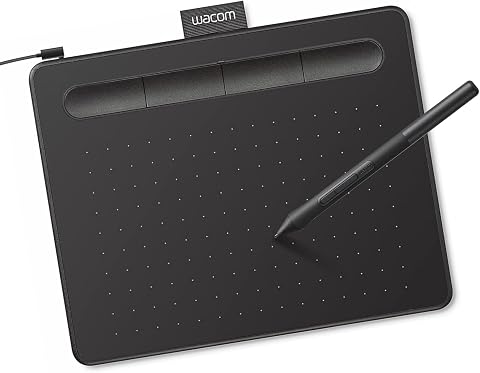 Wacom Intuos Small Wired Drawing Tablet with PenView on Amazon →
- 7
 HUION Inspiroy H1060P Graphics Drawing Tablet, 10 x 6.25 inView on Amazon →
- 8
 HUION Inspiroy H640P 6 × 4-Inch Drawing Tablet with Battery-Free StylusView on Amazon →
Match the Tablet to Your Workflow
ThorstenMeyerAI.com’s guide distinguishes the products by how they handle the drawing workflow. A display tablet lets artists draw on the visible artwork, while a pen tablet pairs a separate drawing surface with a computer monitor and may take practice to coordinate. The guide presents standalone models as a way to avoid a computer connection for supported tasks, while noting that their supported apps and workflow may differ from a desktop setup.
For buyers, the guide’s comparison makes compatibility and workspace more consequential than a small difference in an advertised pen specification. A compact tablet may suit travel or a small desk but feel restrictive for broad strokes; a larger surface takes more room and hand movement. Shortcut keys and dials are useful only if they suit the artist’s routine and can be mapped to commands they use.
Products Worth Considering

Apple AirPods Pro 3 Wireless Earbuds with Active Noise Cancellation

Bose QuietComfort Headphones (2nd Gen), Wireless Noise-Cancelling Over-Ear Headphones, Black

Apple MacBook Air 13-inch with M5 chip, 16GB Memory, 1TB SSD, Starlight
As an affiliate, we earn on qualifying purchases.
Three Setups, Different Tradeoffs
ThorstenMeyerAI.com groups the products by setup rather than treating them as interchangeable. Screen tablets connect to a computer and put the image under the pen; screenless pen tablets connect to a computer but use its monitor; standalone tablets support drawing without that computer for compatible tasks. Each arrangement changes portability, app choice and setup requirements.
The guide identifies the Kamvas 13 (Gen 3) as its overall pick, the H1060P as a value option for artists who already have a computer, and the Frunsi RubensTab T11 Pro as a standalone choice. It also names the PicassoTab A10 as another standalone option. These are the source’s editorial assessments, not independently verified test results; the supplied material includes no testing methodology, current pricing or detailed operating-system compatibility table.
Verify Versions and Compatibility
The supplied ThorstenMeyerAI.com guide does not establish current 2027 prices, availability or specifications, and it does not document independent testing for its rankings. It also does not identify the precise differences between the two XP-Pen Artist 13.3 Pro V2 listings. Product names alone are not enough to confirm whether packages, accessories or specifications match.
Compatibility remains a buyer-side check. The material does not list every supported operating system, computer connection, adapter requirement or drawing app for each model. For standalone tablets, it does not specify which creative apps are available or how their features compare with desktop software. Confirm those details against manufacturer and retailer information for the exact model and package.
Check the Exact Model Before Buying
ThorstenMeyerAI.com’s source guide reports no product launch or next industry milestone. The practical next step for a shopper is to compare the exact model listing with their computer or mobile device, preferred art software, desk space and travel needs. For display tablets, check the required video and power connections; for pen tablets, consider whether the active area suits the way you draw.
Before ordering, verify the included accessories, compatibility and return terms, especially for the similar XP-Pen listings and standalone devices. Prices and availability may change, so consult current seller and manufacturer listings rather than relying on the guide as a live inventory report.
Key Questions
Is this an announcement of new tablets for 2027?
No. ThorstenMeyerAI.com’s source is a buying guide comparing eight named products. It does not report a 2027 launch or confirm new specifications for that year.
Which tablet does the guide rank first?
ThorstenMeyerAI.com names the HUION Kamvas 13 (Gen 3) as its overall pick, citing its display and dual dial controls. The tablet still requires a compatible computer and suitable connection.
What is the difference between a screen tablet and a pen tablet?
A screen tablet displays the artwork beneath the pen. A screenless pen tablet uses a separate computer monitor, with the artist drawing on a surface that does not show the image.
Can the Frunsi RubensTab T11 Pro and PicassoTab A10 be used without a computer?
ThorstenMeyerAI.com describes both as standalone options for supported tasks. Its guide does not list their supported apps or establish that they match a computer-based workflow, so check app availability for the exact model.
How should buyers compare the two XP-Pen listings?
The source guide advises checking the exact product version, specifications and included accessories. It says the listings appear closely related but does not confirm whether their packages are identical.
Source: ThorstenMeyerAI.com