
The secret to smoother drone movements isn’t about pushing your controls hard or making quick, big adjustments. Instead, you should focus on gentle, deliberate inputs, proper calibration, and understanding environmental factors like wind or obstacles. Careful planning and patience help maintain stability and create professional-looking footage. Rushing or overcontrolling only causes jitter and instability. Want to discover more key techniques that turn rough flights into smooth, cinematic shots? Keep exploring to learn how mastering these fundamentals makes all the difference.
Key Takeaways
- Small, gradual control inputs prevent jitter and maintain steady flight paths.
- Proper calibration of sensors and stabilization systems is crucial for smooth movements.
- External factors like wind require deliberate adjustments for consistent footage.
- Patience and precise handling techniques are more effective than rushing or overcontrolling.
- Planning routes and understanding drone response lead to more professional, stable shots.
Achieving smoother drone movements is essential for capturing professional-quality footage and ensuring stable flight. Many pilots assume that mastering complex maneuvers or investing in high-end equipment is the key to better aerial photography. However, the true secret lies elsewhere— in understanding and controlling the subtle factors that influence flight stability. Smooth movements don’t come solely from aggressive control inputs or fancy gear; they result from a combination of precise handling, proper setup, and thoughtful planning. When you focus on these elements, your drone’s flight becomes more stable, and your footage gains that polished, cinematic quality.
Smooth drone movements rely on precise handling, proper setup, and thoughtful planning for cinematic, professional-quality footage.
One of the most overlooked aspects of achieving smooth drone movements is understanding how to optimize flight stability. It’s not just about keeping the drone in the air but ensuring it responds predictably and gently to your commands. Small, deliberate adjustments are often more effective than large, abrupt controls. This requires practicing patience and developing a gentle touch, especially when executing complex aerial photography shots. Overcontrolling can cause jittery footage or unstable flight paths, undermining the very quality you’re trying to elevate. Instead, aim for smooth, gradual inputs, especially during turns and altitude changes, to maintain a steady horizon and fluid motion. Flight stability is a critical component often influenced by both the drone’s design and the pilot’s handling techniques. Additionally, understanding how sensor calibration impacts flight behavior can further enhance stability and reduce unintended movements. Recognizing the importance of flight data and telemetry can also help pilots make informed adjustments during flight, contributing to overall smoothness. Moreover, paying attention to the drone’s center of gravity can help maintain balance and prevent unwanted drifting during flight. Properly configuring these systems and understanding their interactions is essential for achieving optimal flight performance.
Another *indispensable* element is the calibration and configuration of your drone’s sensors and stabilization systems. Many pilots overlook the importance of proper calibration— from IMUs to gimbals— which directly impacts flight stability. Regularly updating firmware and ensuring the drone’s calibration is accurate helps prevent drift and jitter during flight. Additionally, selecting appropriate flight modes, such as GPS or sport mode, can *substantially* influence how smoothly the drone responds to your controls. In GPS mode, the drone can lock onto satellites, maintaining position even in gusty winds, which results in more stable footage. Understanding the role of flight environment and how external factors like wind or obstacles can affect your drone’s behavior helps in planning smoother flights. Planning your flight path carefully also plays a *crucial* role. Instead of rushing through shots or making sudden movements, take time to map out your route. Smooth, slow, and deliberate movements will translate into more professional-looking footage. Wind conditions, lighting, and the environment all affect how smoothly your drone can move, so adjusting your flight plan accordingly makes a difference. Remember, the secret to smoother drone movements isn’t just about controlling the drone—it’s about understanding how to work with its systems and environment to achieve precise, stable flight. When you master these aspects, your aerial photography will stand out, delivering footage that’s sharp, steady, and visually *engaging*.

CADDXFPV Walksnail GM2 V1-Axis Gimbal – FPV Head Tracking
2-Axis Head Tracking: Paired with CaddxFPV Head Tracker and Avatar HD Goggles, the GM2 enables responsive head tracking…
As an affiliate, we earn on qualifying purchases.
As an affiliate, we earn on qualifying purchases.
Frequently Asked Questions
How Do Weather Conditions Affect Drone Smoothness?
Weather conditions substantially impact your drone’s smoothness. Wind resistance causes instability, making it harder to keep your drone steady and resulting in jerky movements. Additionally, adverse weather can reduce battery efficiency, limiting flight time and forcing you to land sooner. To maintain smooth footage, fly during calm weather, avoid strong winds, and monitor battery levels closely. Weather truly plays a vital role in achieving those seamless drone movements.
What Role Does Camera Stabilization Play?
Camera stabilization acts as your drone’s steady hand, turning shaky footage into smooth, cinematic shots. You’ll want to regularly perform gimbal calibration to guarantee it stays balanced, especially after impacts or extreme conditions. Keep an eye out for lens distortion, which can warp your images. Proper stabilization transforms your footage from a chaotic storm into a calm lake, making your videos visually stunning and professional.
Can Software Updates Improve Movement Quality?
Yes, software updates can improve movement quality by optimizing hardware calibration and enhancing stabilization algorithms. When you update your drone’s software, it often includes fixes that improve how the hardware responds to pilot inputs, making movements smoother. Pairing these updates with good pilot technique guarantees better control and steadier footage. Keep your software current to benefit from these enhancements, and practice smooth, deliberate movements for the best results.
How Does Drone Weight Impact Stability?
Drone weight directly impacts stability; heavier drones often have better momentum, making them steadier in flight. A larger battery capacity helps maintain consistent power, reducing sudden movements, while optimized propeller design ensures smoother airflow. If your drone is too light, it may be more affected by wind, causing jittery motion. Balancing weight with battery and propeller quality improves overall stability, leading to more fluid, professional footage.
Are Specific Flight Modes Better for Smooth Footage?
Think of flight modes as your drone’s dance partners. For smooth footage, manual control often leads to graceful aerial framing, allowing you to fine-tune movements with precision. While intelligent modes can automate some tasks, they may introduce jerks. If you want seamless shots, stick with manual control—it’s like conducting your drone’s dance, guiding every step with steady hands for cinematic flow and fluidity.

Propeller Puller Aluminum Alloy Removal Tool Props Remover, with Replacement Ejector Pins for RC FPV Drone BetaFPV Air65 75 (Black)
Durability: Impact-resistant and adaptable to various environments.
As an affiliate, we earn on qualifying purchases.
As an affiliate, we earn on qualifying purchases.
Conclusion
Remember, achieving smoother drone movements isn’t just about fancy equipment or quick reflexes. Focus on gentle, controlled adjustments and maintaining steady momentum. Did you know that even a slight shift in your joystick can cause a ripple effect, leading to jittery footage? By mastering subtle inputs, you can create flawless, cinematic shots that captivate viewers. Keep practicing those smooth handovers—you’ll be amazed at how polished your flights become. Your footage will look so professional, viewers might think it’s all autopilot.

2PCS Replacement Joystick for DJI RC/RC 2 Remote Controller Aluminium Thumb Sticks Compatible with DJI Mini 3 Pro/Mini 4 Pro/Air 3 Flip Fly More Combo Drone Accessory(Silver Grey)
Newly designed replacement joystick for DJI RC remotes. Can be used to replace the original joystick of the…
As an affiliate, we earn on qualifying purchases.
As an affiliate, we earn on qualifying purchases.
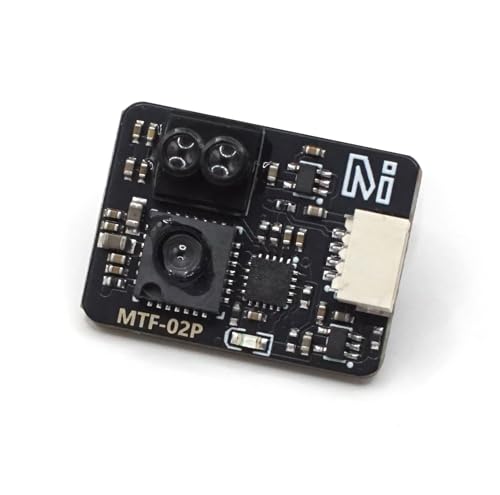
MicoAir Optical Flow & Range Sensor MTF-02P Compatible with Ardupilot/PX4/INAV
Multi-Protocol Compatibility for Mainstream Flight Control Systems The MTF-02P supports various communication protocols, including Mavlink and MSP, making…
As an affiliate, we earn on qualifying purchases.
As an affiliate, we earn on qualifying purchases.