If you’re an editor in 2025 looking for unmatched speed and connectivity, I recommend checking out the top Thunderbolt 4 docks like the CalDigit TS4, Anker Prime TB5, and Plugable models. These docks offer high-resolution display support, fast data transfer, and substantial power delivery to keep your devices charged. Their extensive port options help streamline your workflow and manage multiple peripherals easily. Keep exploring further to discover which dock fits your setup perfectly and enhances your productivity.

Get the latest gadgets delivered free — and shop member deals
- Fast, free delivery on millions of items
- Access to Prime Big Deal Days deals on October 6–7
- Prime Video, Amazon Music and more included
Key Takeaways
- Look for docks supporting dual 4K@60Hz or 8K@30Hz displays for optimal editing workflows.
- Prioritize models with Thunderbolt 4 ports offering 40Gbps data transfer speeds for fast file transfers.
- Choose docks with high power delivery (85W-230W) to charge laptops and peripherals simultaneously.
- Ensure compatibility with your device’s operating system and support for high-resolution multi-monitor setups.
- Consider build quality and port versatility, including HDMI, USB-A, SD card readers, and Ethernet for comprehensive connectivity.
CalDigit TS4 Thunderbolt 4 Dock with 18 Ports and 98W Charging

If you’re an editor who needs maximum connectivity, the CalDigit TS4 Thunderbolt 4 Dock is an ideal choice, especially because it offers 18 ports and 98W charging. I appreciate how versatile it is, with 3 Thunderbolt 4 ports, 8 USB-A ports, SD & microSD card readers, DisplayPort 1.4, and audio jacks. It supports up to 8K or dual 6K displays and delivers enough power to charge laptops and devices simultaneously. The 2.5GbE port speeds up network transfers, making it perfect for demanding workflows. Its compact size and broad compatibility with Macs, Windows, and USB-C devices make it a reliable hub for any professional setup.
Best For: professionals and power users who require maximum connectivity, high-resolution display support, and fast network speeds in a compact docking solution.
Pros:
- Offers 18 versatile ports including 3 Thunderbolt 4 ports, 8 USB-A ports, SD & microSD card readers, DisplayPort 1.4, and audio jacks.
- Supports high-resolution displays up to 8K or dual 6K 60Hz on compatible Macs and Windows devices.
- Provides 98W power delivery, enabling simultaneous charging of laptops and connected devices.
Cons:
- Performance is limited by the host device’s interface (e.g., Thunderbolt 3 or lower reduces speed).
- Slightly bulky for a dock, which might be a concern for very portable setups.
- Customer rating is 4.1/5, indicating some users may experience compatibility or performance issues.
Anker Prime TB5 Docking Station, 14-in-1 Thunderbolt 5 Dock
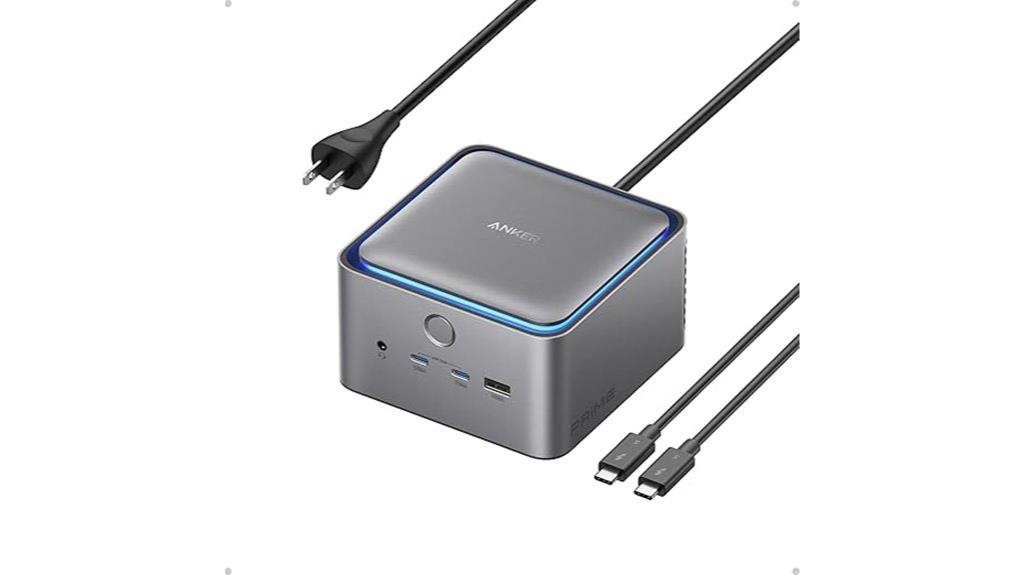
For editors demanding maximum speed and versatility, the Anker Prime TB5 Docking Station stands out as an ideal choice, thanks to its 14-in-1 Thunderbolt 5 connectivity. It offers rapid data transfer—moving a 150GB file in just 25 seconds—and supports up to 8K@60Hz displays, either single or dual. With 140W Power Delivery, it charges devices quickly, while multiple ports—including Thunderbolt 5, USB-C, USB-A, SD card readers, Ethernet, and audio—cover all your connectivity needs. Its active cooling system ensures consistent performance under heavy loads. Compact and feature-rich, this dock is perfect for editors who need speed, power, and flexibility in one device.
Best For: professionals and editors who require ultra-fast data transfer, versatile display options, and reliable power delivery in a compact, high-performance docking solution.
Pros:
- Supports rapid data transfer, moving 150GB in just 25 seconds via Thunderbolt 5.
- Capable of supporting up to 8K@60Hz displays, single or dual, for high-resolution visual workflows.
- Provides up to 140W Power Delivery, enabling fast charging for connected devices.
Cons:
- Windows laptops may be limited to a single external display due to compatibility restrictions.
- The dock’s advanced features and ports may come at a higher price point compared to simpler docks.
- Requires Thunderbolt 5 compatible laptops or devices to access full performance capabilities.
Plugable Thunderbolt 4 Dock with 100W Charging

The Plugable Thunderbolt 4 Dock stands out for editors who need reliable, high-speed connectivity combined with powerful charging capabilities. Certified by Thunderbolt and Intel Evo, it offers blazing-fast 40Gbps Thunderbolt 4 speeds, supporting dual 4K displays or an 8K monitor. With 13 ports, including HDMI, USB, SD card reader, Ethernet, and a Thunderbolt downstream port, it handles all peripherals seamlessly. Its 100W Power Delivery (96W certified) ensures your laptop stays charged during intensive work. Built for modern systems, it’s compatible with Windows and macOS, making it a versatile, durable choice for professional editors seeking unmatched performance.
Best For: professional editors and power users seeking reliable, high-speed connectivity with robust charging capabilities for demanding workflows.
Pros:
- Certified Thunderbolt 4 and Intel Evo for top-tier performance and compatibility
- Supports dual 4K displays or an 8K monitor for versatile visual setups
- 13 high-performance ports including 100W Power Delivery for efficient charging
Cons:
- Compatibility may vary with older systems or non-certified Thunderbolt/USB-C laptops
- Larger footprint may require ample desk space for setup
- Premium price point reflecting advanced features and build quality
Amazon Basics Thunderbolt 4/USB4 Pro Docking Station

Offering a versatile solution, the Amazon Basics Thunderbolt 4/USB4 Pro Docking Station stands out for its compatibility with recent Windows and Mac laptops, making it ideal for editors who need reliable, high-speed connectivity on the go. It supports Thunderbolt and USB4 functions, enabling dual 4K@60Hz displays and an 8K30Hz HDMI output. With 3 USB-A ports, a 2.5Gbps Ethernet port, and up to 96W charging, it covers essential needs. Designed for portability, it easily fits into bags. Keep in mind, Thunderbolt bandwidth sharing may affect display resolution and LAN speed when multiple high-bandwidth devices are connected.
Best For: professionals and creators who need reliable high-speed connectivity, multiple display support, and portable docking solutions for Windows and Mac laptops on the go.
Pros:
- Supports dual 4K@60Hz displays and 8K30Hz HDMI output for high-resolution visuals
- Compatible with Thunderbolt 4 and USB4 laptops, including recent Windows and non-M1/M2 MacBooks
- Offers charging up to 96W and multiple ports (USB-A, Ethernet) in a travel-friendly design
Cons:
- Thunderbolt bandwidth sharing may reduce display resolution and LAN speed when multiple high-bandwidth devices are connected
- Not compatible with Linux, Chrome OS, or older macOS versions (maxOS 10.16 or earlier)
- Performance of ports may decline under high load due to shared bandwidth and device demands
Plugable 16-in-1 Thunderbolt 4 Dock with Dual 4K Monitors

If you need a versatile dock that can handle demanding editing workflows, the Plugable 16-in-1 Thunderbolt 4 Dock is an excellent choice. Recognized as the 2025 Dock of the Year by Laptop Mag, it offers seamless support for dual 4K monitors on Macs, Windows, and USB4 systems. With no driver installation needed, it connects effortlessly via HDMI or DisplayPort. It supplies 100W Power Delivery, ensuring your laptop stays charged all day. The dock also features 7 USB ports, fast Ethernet, SD card readers, and audio options, transforming your laptop into a powerful, efficient workstation perfect for multitasking, content creation, and professional editing.
Best For: professionals and content creators who need a reliable, versatile dock to support dual 4K monitors and multiple peripherals for demanding editing workflows.
Pros:
- Supports dual 4K 60Hz displays on Mac, Windows, and USB4 systems without requiring drivers
- Provides 100W Power Delivery to keep laptops charged all day
- Offers extensive connectivity with 7 USB ports, Ethernet, SD/microSD card readers, and audio options
Cons:
- Slightly higher price point compared to basic docks with fewer features
- Requires Thunderbolt 4 or compatible ports, limiting compatibility with older laptops
- 3.3ft/1m cable may be less convenient for some workspace setups
Satechi Thunderbolt 4 Dock with 100W Charging and Dual 4K HDMI Monitors

For editors seeking a reliable docking station that can handle demanding workflows, the Satechi Thunderbolt 4 Dock stands out with its 100W charging capacity and support for dual 4K HDMI monitors. It offers blazing-fast data transfer speeds up to 40Gbps, supports daisy-chaining multiple devices, and includes essential ports like Ethernet, SD card reader, and USB-C PD charging. Compatible with a wide range of Thunderbolt 4 and USB4 devices, it’s perfect for high-resolution displays and external graphics. Its compact design and robust build make it both practical and versatile, ensuring you stay productive without sacrificing performance or connectivity.
Best For: professionals and creatives who need a reliable, high-performance docking station to manage multiple high-resolution displays, fast data transfer, and various peripherals in demanding workflows.
Pros:
- Supports dual 4K HDMI monitors with 60Hz refresh rate for crisp, high-quality visuals.
- Blazing-fast data transfer speeds up to 40Gbps and daisy-chaining capabilities for multiple devices.
- Provides 100W power delivery via USB-C, enabling efficient charging of connected laptops and devices.
Cons:
- Limited to a maximum of 3 displays with Mac M2/M1 processors, which may restrict multi-monitor setups for some users.
- Slightly bulky design may impact portability for users needing a highly compact solution.
- Price point might be higher compared to simpler or less feature-rich docking stations.
Lenovo Thinkpad Docking Station with USB-C (40B00135US)

The Lenovo ThinkPad Docking Station with USB-C (40B00135US) stands out as an excellent choice for professionals who need reliable, high-performance connectivity. It offers a wide range of ports, including HDMI, DisplayPort, and Thunderbolt, supporting up to 8K and multiple 4K displays for crisp visuals. The dock is compatible with various laptops and notebooks, provided they support USB-C or Thunderbolt, with firmware updates enhancing performance. Its 135W power adapter delivers up to 230W Power Delivery, ensuring fast charging and stable operation. With a one-year warranty and included cables, it’s a versatile, efficient solution for demanding editing workflows.
Best For: professionals and power users who require reliable, high-performance connectivity and support for multiple high-resolution displays with their compatible laptops or notebooks.
Pros:
- Supports up to 8K and multiple 4K display outputs for crisp visuals.
- Includes a powerful 135W AC adapter with up to 230W Power Delivery for fast charging and stable operation.
- Offers comprehensive connectivity with HDMI, DisplayPort, Thunderbolt, and other ports, suitable for versatile setups.
Cons:
- Compatibility requires USB-C or Thunderbolt support, which may necessitate firmware updates or specific device support.
- The dock’s size and multiple cables might be less portable for users needing a lightweight solution.
- Limited to a 1-year warranty, which may be shorter than some users prefer for long-term peace of mind.
UGREEN Thunderbolt 4 Dock 8-in-1 (Revodok Max 208)

Professionals demanding high-speed data transfer and multi-display setups will find the UGREEN Thunderbolt 4 Dock 8-in-1 an ideal choice, thanks to its triple Thunderbolt 4 ports supporting up to 40Gbps. It’s compatible with Thunderbolt 4, Thunderbolt 3, USB4, and USB-C devices, making it versatile for MacBooks, Windows laptops, Mac mini, and tablets. The dock supports dual 4K@60Hz displays or an 8K@30Hz setup on Windows, and similar resolutions on MacBooks. With a 140W GaN charger providing up to 85W charging, it combines fast data transfer, high-resolution display support, and reliable power delivery, streamlining professional workflows.
Best For: professionals and power users who require high-speed data transfer, multi-display support, and reliable power delivery for their high-performance laptops and tablets.
Pros:
- Supports dual 4K@60Hz displays or single 8K@30Hz for Windows, and similar high-resolution options for MacBooks, enhancing visual productivity
- Features three Thunderbolt 4 ports with data transfer speeds up to 40Gbps, suitable for demanding workflows
- Includes a powerful 140W GaN charger capable of delivering up to 85W to compatible laptops, reducing clutter from multiple chargers
Cons:
- Requires connection to the included charger to operate, which may limit portability in some scenarios
- Not compatible with Mac mini 2018 (Intel), limiting use on older Mac mini models
- Basic M-Chip MacBooks support only one 4K@60Hz display, restricting multi-display capabilities on some MacBook models
UGREEN Thunderbolt 4 Dock 13-in-1 Docking Station

If you’re looking for a versatile dock that can handle demanding workflows, the UGREEN Thunderbolt 4 Dock 13-in-1 offers an impressive array of ports and high-speed connections. It features 2 Thunderbolt 4 ports, DisplayPort 1.4, 2.5Gb Ethernet, SD/TF card readers, USB-C 3.2, USB-A 3.2, USB-A 3.0, a 3.5mm audio jack, and a 180W power input. It supports dual 4K@60Hz or single 8K@30Hz displays on Windows, and dual 4K@60Hz on Mac. With 40Gbps transfer speeds and 90W charging, it’s perfect for creative professionals, gamers, and multitaskers needing reliable, high-performance connectivity.
Best For: creative professionals, gamers, and multitaskers seeking high-performance connectivity and multiple display support.
Pros:
- Extensive port options including Thunderbolt 4, DisplayPort 1.4, and multiple USB-A and USB-C ports for versatile device connectivity
- Supports dual 4K@60Hz or single 8K@30Hz displays on Windows, and dual 4K@60Hz on Mac, ideal for high-resolution multitasking
- 180W power input with 90W charging capability simplifies workspace setup by reducing the need for additional chargers
Cons:
- Full functionality requires the dock to be connected to power, limiting portability when unplugged
- Compatibility issues with certain devices, such as the Intel Mac mini 2018, may restrict use in some setups
- Supports only a single display on full-function USB-C laptops, which may be limiting for users needing multiple displays on all devices
ThinkPad Thunderbolt 4 Workstation Dock
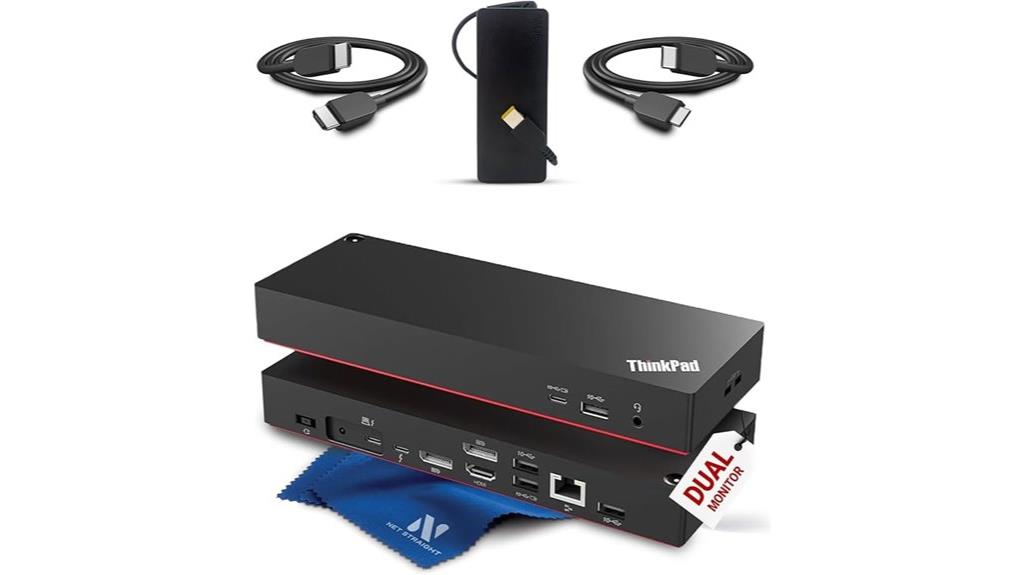
Designed for demanding workstation laptops, the ThinkPad Thunderbolt 4 Workstation Dock delivers an impressive 230W power output, making it an ideal choice for editors who run heavy workloads and need reliable, high-performance connectivity. It supports Thunderbolt 3, Thunderbolt 4, USB4, and USB-C devices, ensuring broad compatibility. With the ability to connect up to four 4K displays or an 8K monitor, it’s perfect for multi-monitor setups. The dock offers blazing-fast 40Gbps data transfer, multiple USB-A and USB-C ports, and Gigabit Ethernet. Compact and professional-grade, it’s tailored for high-end workflows, remote management, and demanding editing tasks.
Best For: professionals and power users who require high-performance connectivity, multi-monitor support, and reliable power delivery for demanding workstation laptops.
Pros:
- Supports up to four 4K displays or an 8K monitor for versatile multi-monitor setups
- Offers 230W power delivery suitable for heavy workloads and high-performance laptops
- Fast data transfer speeds of 40Gbps via Thunderbolt 4 for quick file sharing
Cons:
- Sold as a gray market product without manufacturer warranty
- Slightly bulky with dimensions of 8.66 x 3.15 x 1.18 inches and weighs 15.8 ounces
- First available in August 2025, which may limit immediate availability and support
Plugable Thunderbolt 4 Dock for MacBook Air & Pro with 4K HDMI, USB, SD, Ethernet
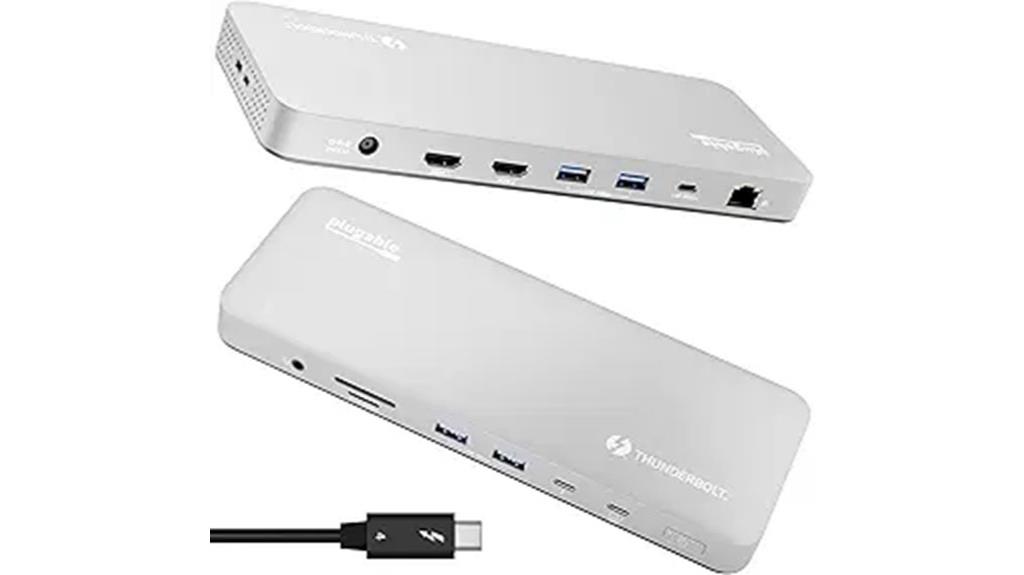
For editors who need reliable, high-performance connectivity, the Plugable Thunderbolt 4 Dock stands out as an excellent choice. It’s fully plug-and-play, compatible with M4, M5 MacBook Air, M1, M2, M3 MacBooks, and Windows systems with Thunderbolt 4 or USB4. With dual 4K HDMI outputs, it supports multiple monitors, including 6K on a single display, perfect for editing and multitasking. The dock provides 100W charging, ensuring your MacBook stays powered. Its sturdy aluminum build, diverse ports—including SD card reader, Ethernet, and USBs—combine durability with convenience. Plus, lifetime support from North American experts guarantees reliable performance.
Best For: creative professionals and power users who need reliable, high-performance multi-monitor setups, fast data transfer, and robust connectivity for MacBook and Windows systems.
Pros:
- Supports dual 4K HDMI outputs (60Hz) and up to 6K single display, ideal for editing and multitasking
- Delivers 100W charging to keep laptops powered during intensive use
- Durable aluminum build with a comprehensive array of ports including SD card reader, Ethernet, and multiple USB options
Cons:
- Limited to single external display on M1/M2 MacBooks; dual displays require M3 Macs in clamshell mode
- May be more expensive compared to basic docks with fewer features
- Requires Thunderbolt 4 or USB4 compatibility, limiting use with older systems
Kensington Thunderbolt 4 and USB4 Display Docking Station
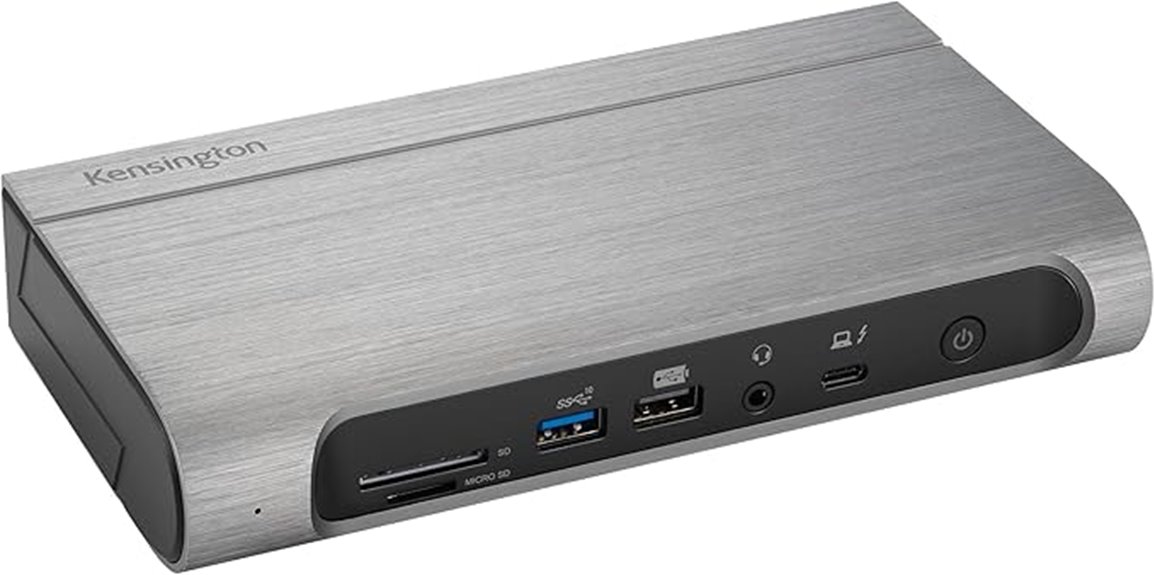
The Kensington Thunderbolt 4 and USB4 Display Docking Station stands out as an ideal choice for creative professionals needing versatile connectivity and high-resolution display support. It offers broad compatibility with Thunderbolt 4, Thunderbolt 3, USB4, and USB-C devices on Windows 10+ and macOS 11+. The dock supports up to four 4K displays at 60Hz or an 8K single display, perfect for high-res editing. With 100W charging power, it keeps your devices powered efficiently. Its 16-in-1 port array includes HDMI, DisplayPort, USB-C, USB-A, SD card readers, and audio jacks, making it a all-encompassing hub for demanding workflows.
Best For: creative professionals and power users who require versatile connectivity, high-resolution display support, and fast data transfer for demanding workflows.
Pros:
- Universal compatibility with Thunderbolt 4, Thunderbolt 3, USB4, and USB-C devices on Windows 10+ and macOS 11+.
- Supports up to four 4K displays at 60Hz or an 8K single display, ideal for high-resolution editing.
- Includes 16-in-1 port array with HDMI, DisplayPort, USB-A, USB-C, SD card readers, and audio jacks for comprehensive connectivity.
Cons:
- The dock’s size and port density may require ample desk space and cable management.
- Advanced features like dual 8K support may be limited to specific MacBook models with M1/M2/M3 Pro/Max chips.
- Some users might find the setup and software configuration complex without technical familiarity.
Minthouz Thunderbolt 4 Dock with 160W Adapter

If you need a reliable docking station that can handle demanding workflows, the Minthouz Thunderbolt 4 Dock with 160W Adapter stands out thanks to its powerful 96W power delivery. It offers a thorough 12-in-1 interface, including Thunderbolt 4, dual HDMI (8K@60Hz), USB-C, multiple USB-A ports, Ethernet, SD/TF card slots, and a phone jack. It supports high-resolution displays on both Windows and Mac devices, making multitasking seamless. With Thunderbolt 4’s 40Gbps transfer speeds and 2.5G Ethernet, file transfers and internet connections are lightning-fast. Plus, it efficiently charges laptops and accessories, streamlining your workspace with a single, versatile connection.
Best For: professionals, creatives, and power users who require high-speed, reliable connectivity and multi-display support for demanding workflows.
Pros:
- Extensive 12-in-1 interface including Thunderbolt 4, dual HDMI, and multiple USB ports for versatile device connectivity
- Supports high-resolution displays up to 8K@60Hz and 4K@60Hz, ideal for multitasking and creative work
- Fast data transfer speeds of 40Gbps via Thunderbolt 4 and 2.5G Ethernet ensure quick file sharing and stable internet
Cons:
- The dock’s size may be less portable for on-the-go use
- Requires compatibility with Thunderbolt 3/4 or USB4 systems, limiting use with older laptops
- The high power requirement (160W adapter) could be overkill for basic setups or less demanding tasks
OWC Thunderbolt Go Dock with 11 Ports
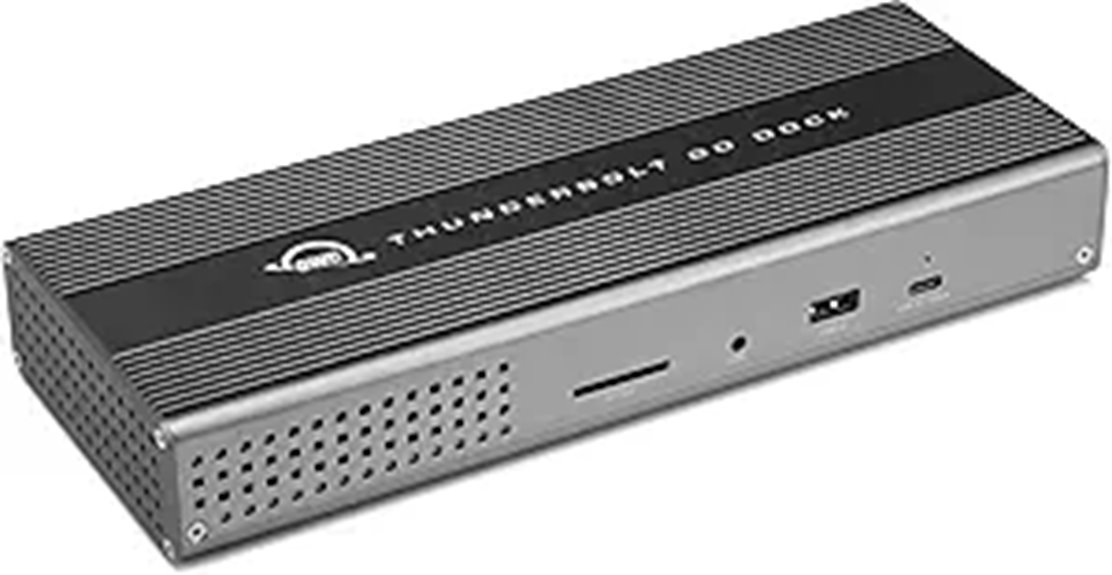
The OWC Thunderbolt Go Dock stands out with its impressive 11 ports and built-in 90W power supply, making it an ideal solution for professional editors who need extensive connectivity without juggling multiple adapters. It supports Thunderbolt 4, USB-C, HDMI, Ethernet, SD cards, and various USB ports, all in one compact device. The dock can deliver up to 90W power to your laptop, reducing clutter and simplifying setup. With support for high-resolution displays up to 8K and fast data transfer speeds, it’s perfect for demanding workflows. Plus, it’s compatible with Macs, PCs, and tablets, offering versatile, reliable performance across platforms.
Best For: professionals and power users who need extensive, versatile connectivity and high-resolution display support in a compact, all-in-one dock.
Pros:
- Supports up to 11 different ports including Thunderbolt 4, USB-C, HDMI, Ethernet, and SD card readers, reducing the need for multiple adapters.
- Delivers up to 90W power, enabling fast charging and powering laptops directly through the dock.
- Supports high-resolution displays up to 8K @ 60Hz, ideal for demanding creative workflows.
Cons:
- Compatibility and display support may vary depending on the host computer’s hardware and drivers.
- The dock’s size and port arrangement might not suit all workspace setups or preferences.
- Limited to Thunderbolt 4 and USB-C compatible devices, which may require adapters for older or non-compatible hardware.
Plugable Thunderbolt 4 Dock for Quad Monitors

For editors who need to multitask across multiple high-resolution displays, the Plugable Thunderbolt 4 Dock stands out by supporting up to four monitors simultaneously. It connects two HDMI and two Thunderbolt outputs, allowing up to 4K or an 8K display depending on your system. Compatible with Windows, Mac, ChromeOS, and Thunderbolt or USB-C ports, it’s versatile for various setups. The dock provides high-speed data transfer, Gigabit Ethernet, SD card slots, and 96W charging for your laptop. With lifetime support from Plugable’s North American team, it’s a reliable choice for expanding your workspace and boosting productivity.
Best For: professionals and power users who need to connect up to four high-resolution monitors and require reliable data transfer, high-power charging, and extensive port options for their multi-device setup.
Pros:
- Supports up to four monitors simultaneously, including 4K and 8K displays depending on the system.
- Offers high-speed Thunderbolt 4 and DisplayLink technology for versatile video output and data transfer.
- Provides 96W charging capability, ensuring your laptop stays powered during intensive multitasking.
Cons:
- May require software installation on macOS for HDMI functionality, which could add setup complexity.
- Compatibility with M3 Macs requires “clamshell mode,” potentially limiting plug-and-play usability.
- Thunderbolt/USB-C display capabilities can vary depending on the host system, affecting overall display performance.
Factors to Consider When Choosing Thunderbolt 4 Docks for Editors

When selecting a Thunderbolt 4 dock, I focus on compatibility with my devices to avoid connectivity issues. I also consider display output options, power delivery, port variety, and data transfer speeds to guarantee the dock meets my editing needs. Understanding these factors helps me choose a dock that balances performance and versatility for my workflow.
Compatibility With Devices
Choosing the right Thunderbolt 4 dock starts with making sure it’s compatible with your device. First, check that it supports your operating system, like Windows 10+, macOS 11+, or Chrome OS. Next, verify if the dock supports your device’s specific chipset, such as M1, M2, M3, or Intel, for full functionality. Confirm your device has a Thunderbolt 4, USB-C, or USB4 port, since compatibility depends on the host port type. It’s also important to verify the dock can deliver power delivery and charging at your device’s wattage needs, such as 96W or 100W. Finally, review the manufacturer’s compatibility list to ensure it works with your specific device model and any peripherals you plan to connect.
Display Output Capabilities
Display output capabilities are a crucial factor to contemplate because they directly impact your ability to work efficiently across multiple screens. Thunderbolt 4 docks usually support dual 4K displays at 60Hz or a single 8K display at 60Hz, but this depends on your system and configuration. The maximum resolution and refresh rate vary based on whether the dock uses HDMI, DisplayPort, or both, and not all docks support the same standards like DisplayPort 1.4 or HDMI 2.1. Some docks feature multiple ports, enabling multi-monitor setups with high resolutions, but bandwidth limits can affect performance. When choosing a dock, check its maximum resolution and number of external displays to ensure it meets your multi-monitor workflow and display needs.
Power Delivery Strength
Power delivery strength is a critical factor because it guarantees your laptop stays charged during demanding editing sessions. I recommend choosing a dock that provides at least 85W of Power Delivery to reliably power high-performance laptops. It’s essential to confirm that the dock’s Power Delivery is certified and supports the latest standards, like PD 3.1, for maximum efficiency and safety. Adjustable or automatic power management features are also valuable, as they prevent overloading or underpowering connected devices. Always verify that the dock’s Power Delivery output matches or exceeds your laptop’s requirements to avoid insufficient charging or shutdowns during intensive tasks. Generally, higher wattage Power Delivery in docks means better compatibility for running multiple peripherals while keeping your laptop charged, ensuring smooth workflow and productivity.
Port Selection Variety
A diverse port selection is vital for editors who need to connect multiple peripherals and displays seamlessly. Having options like Thunderbolt, USB-C, USB-A, HDMI, and DisplayPort ensures compatibility with various devices and monitors. Multiple Thunderbolt 4 ports allow for high-speed data transfer and daisy-chaining of peripherals without losing performance. Including SD card readers and Ethernet ports simplifies workflows by reducing the need for adapters and additional hubs. Video output options like HDMI and DisplayPort support different monitor types and resolutions indispensable for editing tasks. A dock with a broad range of ports minimizes clutter and streamlines cable management, creating a cleaner workspace. Dedicated audio, security, and power delivery ports further customize connectivity, making the dock an all-in-one solution tailored to professional editing setups.
Data Transfer Speed
When choosing a Thunderbolt 4 dock, understanding data transfer speeds is essential because these speeds directly impact your workflow efficiency. Thunderbolt 4 supports up to 40Gbps, allowing you to transfer large files like 4K videos or extensive photo libraries quickly. Faster transfer rates cut down waiting times, so you can focus on editing rather than file movement. Keep in mind, the actual speeds depend on your host device’s hardware and connected peripherals. Multiple high-speed ports in a Thunderbolt 4 dock enable simultaneous data transfers without slowing down your workflow. Plus, Thunderbolt 4’s backward compatibility ensures you still get high speeds with older Thunderbolt 3 or USB4 devices. Overall, high transfer speeds are a key factor in optimizing your editing process.
Build and Design Quality
Choosing a Thunderbolt 4 dock with solid build and design quality is essential for guaranteeing durability and reliable performance over time. I look for docks made from durable materials like aluminum or high-quality plastics, which can withstand daily use. Precise manufacturing tolerances are crucial, preventing issues like loose ports or uneven surfaces that can disrupt workflow. Robust internal components, such as high-grade controllers and shielding, ensure stable data transfer and minimize interference during intensive editing sessions. A compact, sleek design not only boosts portability but also helps reduce clutter in my workspace. Additionally, features like vents or active cooling systems are vital for heat dissipation, maintaining ideal performance during heavy editing tasks. Overall, a well-designed dock saves time and enhances reliability.
Frequently Asked Questions
How Do Thunderbolt 4 Docks Improve Editing Workflow Efficiency?
Thunderbolt 4 docks boost my editing workflow by providing lightning-fast data transfer and seamless connectivity. With multiple high-speed ports, I can connect my external drives, monitors, and peripherals effortlessly, reducing clutter and saving time. The stable, high-bandwidth connection minimizes lag and ensures smooth playback of large video files. Overall, they make my editing process more efficient, allowing me to focus on creativity instead of technical hiccups.
Are Thunderbolt 4 Docks Compatible With Older USB Standards?
Yes, Thunderbolt 4 docks are compatible with older USB standards. For example, I used a Thunderbolt 4 dock that seamlessly connected my USB 3.0 external drives, providing rapid data transfer without issues. These docks include multiple USB ports supporting various standards, so you can connect older devices while still enjoying the high-speed benefits of Thunderbolt 4. This flexibility makes them a versatile choice for any setup.
What Security Features Are Available With Thunderbolt 4 Docks?
Thunderbolt 4 docks come with robust security features like Intel’s VT-d virtualization technology, which helps prevent DMA attacks, and hardware-based encryption for data protection. They also support the Trusted Platform Module (TPM) for secure key storage and authentication. I always recommend enabling these features and keeping firmware updated to guarantee your data stays safe. Security is essential, especially when handling sensitive editing projects or confidential information.
Can Thunderbolt 4 Docks Support Daisy Chaining Multiple Devices?
Daisy chaining multiple devices with Thunderbolt 4 docks is absolutely possible and a game-changer! I’ve personally connected several peripherals like monitors, external drives, and audio interfaces without a hitch. The Thunderbolt 4 standard supports daisy chaining up to six devices, making it incredibly flexible. Just make sure your devices also support daisy chaining, and you’re golden. It’s a seamless way to expand your setup effortlessly.
What Are the Best Thunderbolt 4 Docks for 8K Video Editing?
If you’re editing 8K videos, I recommend the CalDigit TS4 or the OWC Thunderbolt Hub. These docks offer blazing-fast data transfer speeds, multiple Thunderbolt ports, and reliable power delivery, ensuring smooth workflow. They support multiple high-res displays and fast storage solutions, making them perfect for demanding editing tasks. I’ve found these options reliable and capable of handling the hefty data loads that 8K editing requires.
Conclusion
Choosing the right Thunderbolt 4 dock can truly elevate your editing workflow. With options boasting up to 18 ports and 98W charging, you’ll never run out of connectivity. Did you know that Thunderbolt 4 offers data transfer speeds up to 40Gbps? That’s four times faster than USB 3.0! Investing in a high-quality dock means smoother editing, faster transfers, and greater productivity—making it an essential tool for any serious editor in 2025.
Fall Picks
fall essentials
As an affiliate, we earn on qualifying purchases.