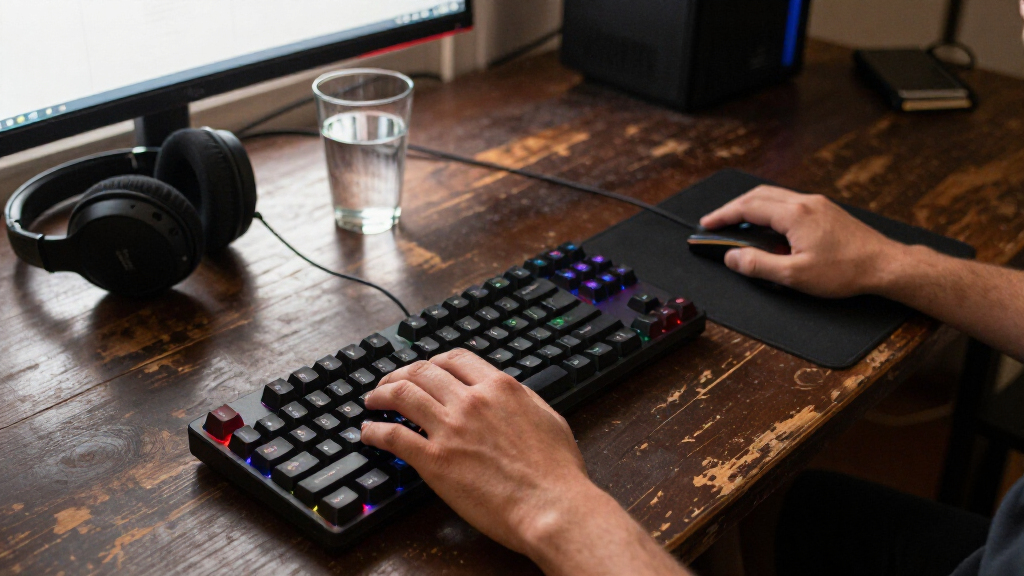

For most players, I’d start with the Razer BlackWidow V4 X: its linear Yellow switches and dedicated macro controls suit fast play without taking over the desk. The AULA WIN60 HE stands out for players who want magnetic switch features in a compact layout, while the Redragon K580 gives full-size users macro keys and a media wheel. The main tradeoffs are layout size, switch feel, wired versus wireless use, and how much customization you actually need. Compact boards save desk space but may omit familiar keys, and quiet linear switches feel different from clicky or tactile options. Read on for the full breakdown and my picks by player type.

Get the latest gadgets delivered free — and shop member deals
- Fast, free delivery on millions of items
- Access to Prime Big Deal Days deals on October 6–7
- Prime Video, Amazon Music and more included
Complete the kit



Key Takeaways
- The BlackWidow V4 X is my best overall gaming pick for its linear Yellow switches and dedicated macro keys, though it is wired and full-size.
- The Redragon K552 is the straightforward value choice for players who want a compact wired board with red switches and RGB, without extra controls.
- The AULA WIN60 HE and WIN68 HE bring Hall effect magnetic switches to 60% layouts, trading dedicated navigation keys for a smaller footprint and gaming-focused adjustability.
- The AULA F75 Pro is the lineup’s flexible wireless 75% option, pairing a more compact layout with hot-swap support and a knob; it suits mixed-use setups better than a fixed wired board.
- Not every mechanical board here is gaming-first: the Logitech MX Mechanical favors wireless productivity, while the SteelSeries Apex 5 uses hybrid switches rather than conventional mechanical switches.
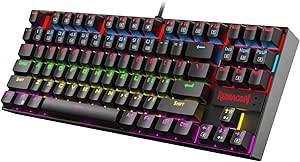



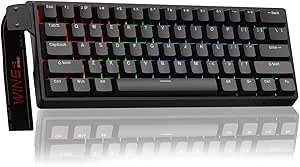


| mechanical gaming keyboard | Switch Type | Connectivity | Number of Keys |
|---|---|---|---|
| Redragon K552 Mechanical Gamin | Linear Red Switch | USB | 87 |
| RisoPhy Mechanical Gaming Keyb | Blue Switch | USB-A | 104 |
| Redragon K580 Wired RGB Mechan | — | — | 104 |
| Womier SK80 75% Mechanical Gam | — | Detachable Type-C | — |
| Redragon Mechanical Gaming Key | Red (Linear) | Wired | 104 |
| Razer BlackWidow V4 X Mechanic | Yellow Mechanical Linear | — | — |
| AULA F75 Pro Wireless Mechanic | Pre-lubed Reaper, hot-swappable | — | — |
| Redragon K668 108-Key Hot-Swap | Linear | USB-C wired | 108 |
| Logitech MX Mechanical Wireles | Tactile Quiet | Bluetooth, Logi Bolt, USB-C | — |
| Aula WIN60 HE 60% Mechanical G | Magnetic Hall Effect | USB-C | — |
| Logitech G413 SE Full-Size Mec | Tactile Mechanical | — | 108 |
| SteelSeries USB Apex 5 Hybrid | Hybrid Blue – Tactile & Clicky | USB | 104 |
| AULA WIN68 HE Mechanical Gamin | Hall Effect Magnetic | Wired USB-C | 68 |
More Details on Our Top Picks
Redragon K552 Mechanical Gaming Keyboard with Red Switches and RGB Backlighting
The Redragon K552 stands out for its compact tenkeyless design, making it ideal for gamers with limited desk space or those who prefer a minimalist setup. Its linear red switches deliver smooth, quiet keystrokes that excel in fast-paced gaming, comparable to the tactile feel of the Blue Switch in the RisoPhy but without the noise. The durable metal top plate enhances longevity, while full anti-ghosting ensures reliable performance during intense sessions. However, its RGB lighting is fixed and cannot be customized via software, which may disappoint users seeking personalized lighting effects. The absence of a dedicated wrist rest and preference for tactile or clicky switches make it less suited for prolonged typing or those who dislike linear switches.
Pros:- Compact tenkeyless design saves desk space
- Vibrant RGB backlighting with multiple modes
- Durable metal construction with anti-slip feet
- Full anti-ghosting and N-key rollover for gaming
Cons:- RGB lighting is fixed and not software customizable
- No dedicated wrist rest included
- Some may prefer tactile or clicky switches
Best for: Gamers seeking a space-saving, durable keyboard with smooth keystrokes and vibrant lighting.
Not ideal for: Typists or users preferring tactile or clicky switches, or those wanting fully customizable RGB lighting.
- Switch Type:Linear Red Switch
- Layout:Tenkeyless (87 keys)
- Backlighting:RGB with 6 preset modes
- Connectivity:USB
- Material:Metal top plate, ABS enclosure
- Dimensions:13.94″ L x 4.86″ W x 1.46″ H
- Water Resistance:Water Resistant
- Number of Keys:87
Our verdict“This keyboard suits gamers who want a sleek, reliable, space-efficient option with smooth keystrokes and vibrant lighting.”
RisoPhy Mechanical Gaming Keyboard, RGB 104 Keys Ultra-Slim LED Backlit USB Wired Keyboard with Blue Switch
The RisoPhy RGB Mechanical Keyboard offers a tactile typing experience with its blue switches, making it ideal for users who enjoy audible feedback, similar to the clicky feel of the Outemu Blue switches in the Redragon K580 but with the added benefit of customizable RGB lighting. Its spill-resistant design with water drainage holes adds practical durability for daily use. The inclusion of multimedia keys and ergonomic features like foldable rear kickstands makes it versatile for both gaming and office tasks. However, the loud blue switches can be disruptive in quiet environments, and its wired-only connection limits mobility. The bright backlighting can also be too intense for some users, especially in dim settings.
Pros:- Responsive blue switches with tactile feedback
- Customizable RGB backlighting with multiple levels
- Anti-ghosting for fast, simultaneous key presses
- Spill-resistant design with water drainage holes
Cons:- Blue switches can be loud for quiet environments
- Wired connection limits mobility
- Some may find backlight brightness too intense
Best for: Enthusiast gamers and typists who prefer tactile, clicky keys and customizable RGB effects.
Not ideal for: Quiet workspace users or those needing wireless flexibility, due to noise and wired limitations.
- Switch Type:Blue Switch
- Number of Keys:104
- Backlighting:RGB
- Connectivity:USB-A
- Water Resistance Level:Water Resistant
- Key Travel:Deeper
- Keycap Pluggability:Yes
- Additional Features:Spill Proof, Media Keys
Our verdict“This keyboard is perfect for users who prioritize tactile feedback and vibrant lighting in a wired setup.”
Redragon K580 Wired RGB Mechanical Gaming Keyboard with Macro Keys and Media Wheel
The Redragon K580 distinguishes itself with five macro keys and a dedicated media wheel, making it ideal for MMO or MOBA gamers who rely on quick-command macros. Its hot-swappable switches add flexibility, allowing users to customize the tactile feel akin to the Outemu Blue switches used here, with the durability rated at 50 million keystrokes. Compared to the more minimalist K552, this model offers more dedicated controls for complex gaming setups. The inclusion of full anti-ghosting and hot-swappable switches enhances reliability, but the reliance on USB-C may pose compatibility issues for some devices. The absence of wireless options might limit portability, and its size may be too large for users with limited space.
Pros:- Customizable macro keys for complex commands
- Hot-swappable switches for easy customization
- Durable build rated for 50 million keystrokes
- Full anti-ghosting for accurate gaming
Cons:- Requires USB-C connection, limiting device compatibility
- No wireless option available
- Size may be too large for small desks
Best for: Gamers who need programmable macro keys, media controls, and switch customization for complex gaming commands.
Not ideal for: Users preferring a compact or wireless keyboard, or those with limited desk space.
- Compatible Devices:Gaming Console
- Connectivity Technology:USB-C
- Additional Features:Ergonomic, Hot-Swappable, Macro Keys, Media Controls
- Keyboard Backlighting Color Support:RGB
- Switch Model:Outemu Blue
- Number of Keys:104
Our verdict“This model caters to gamers demanding extensive customization and durability for high-intensity gaming sessions.”
Womier SK80 75% Mechanical Gaming Keyboard with Color Multimedia Display
The Womier SK80 offers a unique twist with its color multimedia display, providing visual feedback and customization options that go beyond standard RGB effects. Its 75% layout strikes a balance between compactness and functionality, comparable to the smaller Aula WIN60 but with added visual flair. The hot-swappable switches enable easy customization, making it suitable for enthusiasts who enjoy tinkering. Its gasket-mounted design provides a softer, more stable typing feel, ideal for both gaming and productivity. However, the complex features may require a learning curve, and the build quality details are limited, which could impact durability perceptions. The absence of a keycap set inclusion might also inconvenience some users.
Pros:- Vibrant color multimedia display for customization
- Hot-swappable switches for easy personalization
- Multiple lighting effects and macro support
- Soft, stable gasket mount design
Cons:- Complex features may have a learning curve
- Limited info on build durability
- No included keycap set
Best for: Enthusiasts seeking a compact keyboard with visual feedback and customizable features.
Not ideal for: Users who prioritize durability over display features or prefer straightforward setups without complex controls.
- Display:Multimedia color screen with GIF, system info, and settings
- Layout:75%
- Switch Compatibility:3Pin or 5Pin hot-swappable
- Backlighting:RGB with 19 effects and 9 colors
- Connectivity:Detachable Type-C
- System Compatibility:Mac and Windows
Our verdict“This keyboard appeals to visual enthusiasts who want a compact, customizable setup with a multimedia display.”
Redragon Mechanical Gaming Keyboard Wired, 11 Programmable Backlit Modes, Hot-Swappable Red Switch, Anti-Ghosting, Double-Shot PBT Keycaps, Light Up Keyboard for PC & Mac
The Redragon B0CF3VGQFL combines extensive backlit customization with robust build quality, featuring 11 programmable modes and hot-swappable red switches. Its double-shot PBT keycaps resist wear and fading, making it a reliable choice for long-term use. Compared to the K552, it offers a broader range of lighting modes, appealing to users who enjoy dynamic visual effects. The inclusion of macro editing and multimedia shortcuts enhances versatility for gaming and productivity. Its wired-only setup limits portability, and the fixed backlight color may frustrate those seeking full RGB control, especially since software support is required for some customization. Limited wireless options also restrict mobility.
Pros:- 11 programmable backlit modes for dynamic effects
- Hot-swappable red switches for easy customization
- Double-shot PBT keycaps resist wear
- Macro editing and multimedia shortcuts
Cons:- Backlight colors limited to preset modes
- Requires software for full backlight customization
- Limited to wired connectivity
Best for: Gamers and professionals who want a highly customizable, durable keyboard with extensive backlit modes.
Not ideal for: Those seeking wireless or fully RGB-customizable setups without software dependencies.
- Backlit Modes:11
- Switch Type:Red (Linear)
- Number of Keys:104
- Connectivity:Wired
- Keycap Material:Double-Shot PBT
- Compatibility:PC and Mac
Our verdict“This keyboard targets users who need a durable, feature-rich option with customizable backlighting and switch flexibility.”
Razer BlackWidow V4 X Mechanical Gaming Keyboard, Yellow Switches, Black
The Razer BlackWidow V4 X stands out for its ultra-responsive yellow linear switches, which provide quick, quiet actuation perfect for rapid gaming scenarios. Compared to the Logitech MX Mechanical, it emphasizes speed and precision, though it sacrifices some versatility with its wired-only connection and higher price. Its durable doubleshot keycaps and customizable RGB lighting add to its appeal, but the noise dampening may not satisfy those seeking a more tactile or quieter typing experience outside gaming. It’s an excellent choice for competitive gamers who prioritize speed and customization, but less suited for users who prefer wireless or more subdued switches.
Pros:- Fast, linear switches ideal for quick responses
- Customizable RGB lighting with dynamic effects
- Durable doubleshot keycaps resist wear
- Includes macro keys and media controls
Cons:- Limited to wired connection, reducing flexibility
- Higher price compared to basic models
- May be too specialized for non-gaming use
Best for: Competitive gamers who need fast, quiet switches and extensive customization options.
Not ideal for: Casual users or office workers who prefer quiet, tactile feedback or wireless convenience.
- Switch Type:Yellow Mechanical Linear
- Actuation Distance:1.2mm
- Force Required:45g
- Macro Keys:6
- Lighting:Chroma RGB per-key
- Keycap Material:DoubleShot ABS
Our verdict“Best suited for serious gamers who prioritize speed and customization in a wired setup.”
AULA F75 Pro Wireless Mechanical Keyboard, 75% Hot Swappable RGB Backlit Gaming Keyboard with Knob and PBT Side-Printed Keycaps
The AULA F75 Pro offers impressive portability and multi-device compatibility, supporting Bluetooth 5.0, 2.4GHz, and USB-C—making it more adaptable than the Logitech MX Mechanical, which relies solely on Bluetooth. Its hot-swappable switches and RGB effects appeal to users who enjoy customizing their setup without software, a feature not as straightforward on Logitech models. The 75% layout balances compactness with essential keys, but some may find the multi-mode switch setup initially complex, and it only supports linear switches, limiting typing feel options. This pick suits gamers and productivity users seeking flexibility and easy customization, though it might be less ideal for those wanting tactile switches or plug-and-play simplicity.
Pros:- Supports multiple connection modes including Bluetooth and USB-C
- Hot-swappable switches for easy customization
- Rich RGB lighting with multiple effects
- Compact layout saves desk space
Cons:- Multi-mode knob can be confusing initially
- Limited to linear switches, which may not suit all typing preferences
- Requires driver for advanced lighting effects
Best for: Users who need a portable, multi-device keyboard with customization flexibility and minimal software reliance.
Not ideal for: Traditional typists who prefer tactile switches or those seeking a straightforward, wired-only setup.
- Connection Modes:Bluetooth 5.0, 2.4GHz, USB-C
- Battery Capacity:4000mAh
- Switch Type:Pre-lubed Reaper, hot-swappable
- Backlight:RGB, 16.8 million colors
- Layout:75%, 81 keys
- Additional Features:Multi-function knob, programmable keys
Our verdict“Ideal for multi-device users seeking portability, customization, and flexible connectivity without software dependency.”
Redragon K668 108-Key Hot-Swap Wired RGB Gaming Keyboard with Extra Hotkeys
The Redragon K668 provides a full-size, wired experience with hot-swappable linear switches, making it a practical choice for gamers who want extensive macro and hotkey options. Its dedicated shortcut keys for mute, calculator, and desktop enhance productivity, setting it apart from more minimalistic models like the Aula WIN60 HE. The inclusion of extra keycaps allows for personalization, but the lack of wireless options and its water resistance level mean it’s less suited for mobile or spill-prone setups. Its size and wired connection make it less ideal for cramped or portable environments, but it excels as a reliable, feature-rich gaming and work keyboard.
Pros:- Hot-swappable switches for easy upgrades
- Dedicated hotkeys for quick access to common functions
- Includes extra keycaps for personalization
- Vibrant RGB with multiple modes
Cons:- No wireless connectivity options
- Limited spill protection despite water resistance
- Large footprint may not suit small desks
Best for: Gamers and productivity users who want a full-sized, customizable wired keyboard with dedicated hotkeys.
Not ideal for: Users seeking a compact, wireless setup or spill-prone environments without additional spill protection.
- Number of Keys:108
- Switch Type:Linear
- Backlighting:RGB
- Connectivity:USB-C wired
- Water Resistance Level:Water Resistant
- Additional Features:Hot-swappable, extra keycaps
Our verdict“A robust wired choice for users who need full-size functionality, hot-swappable switches, and dedicated hotkeys for gaming or productivity.”
Logitech MX Mechanical Wireless Illuminated Keyboard Tactile – Graphite
The Logitech MX Mechanical excels in multi-device connectivity and ergonomic design, with tactile quiet switches offering precise feedback without noise. While the Razer BlackWidow V4 X prioritizes speed and gaming features, the MX Mechanical emphasizes versatility for professional environments, supporting up to three devices with easy switching. Its smart auto-adjusting backlit illumination and long battery life make it suitable for all-day use, but it requires Logitech’s software for full customization—a step that might deter some users. Its build quality with aluminum and metal adds durability, but it’s less tailored for gaming than dedicated gaming keyboards and won’t satisfy those needing ultra-fast response times.
Pros:- Tactile quiet switches for precise, noise-free feedback
- Supports multi-device pairing with easy switching
- Smart auto-adjusting backlight
- Long-lasting rechargeable battery
Cons:- Requires software for full customization
- Not compatible with Logitech Unifying technology
- Battery life varies based on usage
Best for: Professionals and multi-device users seeking a quiet, ergonomic, wireless keyboard with excellent build quality.
Not ideal for: Competitive gamers requiring ultra-fast response switches or RGB-heavy customization without software dependency.
- Weight:29.2 oz (828 g)
- Dimensions:1.02 x 17.08 x 5.18 in
- Connectivity:Bluetooth, Logi Bolt, USB-C
- Battery Life:Up to 15 days with backlight, 10 months with backlight off
- Switch Type:Tactile Quiet
- Material:Aluminum, Metal
Our verdict“Best suited for professionals and multi-taskers needing a quiet, durable, multi-device wireless keyboard with ergonomic features.”
Aula WIN60 HE 60% Mechanical Gaming Keyboard Wired, Magnetic Switch Hot Swappable, RGB, Compact 60% Layout for PC
The Aula WIN60 HE stands out for its ultra-responsive magnetic hall effect switches, boasting response rates up to 8000Hz—far exceeding typical gaming keyboards like the Redragon K668. Its 60% layout keeps desk space minimal while offering extensive customization through a web-based driver, unlike the Redragon which relies on software. The magnetic switches promise durability and consistent actuation, though the compact size may omit dedicated function keys, which could inconvenience some users. This keyboard is perfect for gamers who prioritize speed and compactness, but less suited for those who need extensive macro keys or prefer tactile switches.
Pros:- Ultra-fast 8000Hz response rate for gaming precision
- Magnetic hall effect switches offer durability and smooth actuation
- Customizable RGB lighting with multiple effects
- Web-based driver for easy remapping and macro creation
Cons:- Limited to Windows OS, lacking Mac support
- No dedicated function row or extra macro keys
- Compact layout may reduce some convenience
Best for: Speed-focused gamers wanting a compact, highly responsive keyboard with easy customization.
Not ideal for: Users needing full-sized keys, dedicated function keys, or tactile switch options.
- Switch Type:Magnetic Hall Effect
- Layout:60%” (61 keys)
- Connectivity:USB-C
- Backlit:RGB
- Response Rate:Up to 8000Hz
- Additional Features:Programmable keys, adjustable actuation
Our verdict“Ideal for speed enthusiasts who want a compact, high-response keyboard with easy customization and durability.”
Logitech G413 SE Full-Size Mechanical Gaming Keyboard – Black
The Logitech G413 SE stands out for its sturdy aluminum top case, which adds a premium feel and durability that surpasses many budget models. Its tactile switches offer satisfying feedback, ideal for gamers who prefer a more pronounced keystroke. Compared to the Redragon K552, it provides a more refined build quality and a sleek design, but it lacks customizable RGB lighting, limiting visual personalization. The white LED backlighting ensures decent visibility in low light, although it’s restricted to a single color, unlike RGB options. The absence of dedicated media keys beyond function keys might inconvenience some users who want quick access to controls. Its reliable anti-ghosting with 6-key rollover makes it a good choice for fast-paced gaming, yet the wired-only connection and limited backlighting options mean it’s less suited for those seeking a fully customizable setup or wireless freedom.
Pros:- Sturdy aluminum top case enhances durability and premium feel
- Tactile switches provide satisfying feedback for gaming and typing
- White LED backlighting improves visibility in dark environments
- Anti-ghosting with 6-key rollover supports fast inputs
Cons:- No wireless or Bluetooth connectivity options
- Limited to single-color backlighting, restricting aesthetic customization
- No dedicated media keys beyond function keys
Best for: Serious gamers who want a durable, straightforward full-size keyboard with reliable performance.
Not ideal for: Gamers who prioritize full RGB customization or wireless connectivity for a clutter-free setup.
- Switch Type:Tactile Mechanical
- Keycaps:PBT, wear-resistant
- Backlighting:White LED
- Layout:Full-size, QWERTY
- Number of Keys:108
- Compatibility:Windows, MacOS
Our verdict“This keyboard makes the most sense for gamers valuing build quality and reliable performance over RGB lighting or wireless features.”
SteelSeries USB Apex 5 Hybrid Mechanical Gaming Keyboard – Per-Key RGB Illumination – Aircraft Grade Aluminum Alloy Frame – OLED Smart Display (Hybrid Blue Switch)
The SteelSeries Apex 5 excels in offering a highly customizable experience, with per-key RGB lighting that surpasses the white-only backlighting of the Logitech G413 SE. Its hybrid blue switches deliver tactile, clicky feedback preferred by gamers who enjoy precise keystrokes, although the noise level might be disruptive in shared spaces. The aircraft-grade aluminum frame guarantees durability, especially compared to plastic-bodied keyboards like the AULA WIN68 HE. Its OLED smart display adds a new layer of interactivity, providing real-time game or chat info—an advantage over more traditional keyboards. However, its larger footprint and the requirement for USB connection can be less portable, and the hybrid switches may be too loud for quiet environments. Still, for competitive or enthusiast gamers seeking extensive customization and interactive features, the Apex 5 offers a compelling package.
Pros:- Aircraft-grade aluminum frame ensures longevity and premium feel
- Per-key RGB lighting for complete visual customization
- OLED smart display provides real-time game and chat info
- Magnetic wrist rest adds comfort during long sessions
Cons:- Larger size may be unsuitable for tight setups
- Hybrid blue switches are loud, not ideal for quiet environments
- Requires USB connection, limiting portability
Best for: Competitive gamers and enthusiasts who value extensive customization, real-time info, and durable build quality.
Not ideal for: Casual gamers or those with limited desk space who prefer a more compact, quieter, or wireless setup.
- Switch Type:Hybrid Blue – Tactile & Clicky
- Connectivity:USB
- Water Resistance Level:Water Resistant
- Number of Keys:104
- Keyboard Layout:AZERTY
- Material:Aluminum
Our verdict“This keyboard suits gamers seeking high customization, durability, and interactive features but sacrifices portability and quiet operation.”
AULA WIN68 HE Mechanical Gaming Keyboard 60% with Hall Effect Magnetic Switches, RGB Backlit, Wired, Black
The AULA WIN68 HE stands out for its ultra-compact 60% layout paired with innovative hall effect magnetic switches, offering highly precise and customizable keystrokes. Its small size makes it ideal for gamers with limited desk space or those who need a portable option, unlike the larger Logitech or SteelSeries models. The 8000Hz polling rate ensures rapid response, giving it an edge in fast-paced games. Its vivid RGB lighting adds flair, with multiple effects to match personal style. However, the small form factor may feel cramped for extended typing or users who prefer dedicated function and arrow keys, which are absent here. Its wired USB-C connection may limit mobility, and the lack of driver support on Mac restricts customization for non-Windows users. Overall, this keyboard suits those who prioritize response time and space efficiency in a high-performance package.
Pros:- High polling rate of 8000Hz ensures ultra-fast response times
- Hall effect magnetic switches provide precise, customizable keystrokes
- Compact 60% design saves desk space and improves portability
- Vivid RGB lighting with multiple preset effects enhances aesthetics
Cons:- Limited to wired connectivity, no wireless option
- Small size may be less comfortable for extended typing sessions
- No dedicated function or arrow keys
Best for: Gamers and professionals who need a compact, high-response keyboard with precise keystrokes and portability.
Not ideal for: Users who prefer a full-sized keyboard with dedicated keys or need wireless connectivity for mobility.
- Switch Type:Hall Effect Magnetic
- Polling Rate:8000Hz
- Backlit:RGB
- Number of Keys:68
- Connectivity:Wired USB-C
- Material:Plastic
Our verdict“Ideal for gamers craving rapid response and space efficiency without sacrificing high-performance features.”
How We Picked
I compared each keyboard by how well its layout, switches, connection, and controls fit gaming use. I gave more weight to responsive, clearly described switch types, dependable wired or wireless setup, and practical features such as hot-swap support, macro keys, and media controls. I also considered the daily cost of a layout choice: a 60% board saves room but removes dedicated keys, while full-size models take more desk space and keep the number pad.
The ranking favors boards with a clear gaming role and useful tradeoffs. The BlackWidow V4 X leads as a capable wired gaming board with linear switches and dedicated macros; the K552 ranks highly for a simpler compact setup. The Hall effect AULA models stand out for a specialized compact use, while general-purpose or hybrid options rank lower for readers specifically seeking a mechanical gaming keyboard. Product names and listed features guide these comparisons; I do not imply hands-on testing or assume unlisted performance claims.
Factors to Consider When Choosing Mechanical Gaming Keyboards
Before choosing a board, I’d match it to the way you play and the space you have. A feature can sound useful on a spec sheet but add little if it conflicts with your habits. These broader checks can help you avoid buying a layout or switch style that frustrates you after the first week.
Pick Switch Feel for Your Games and Shared Space
Linear switches move without a tactile bump, which some players prefer for repeated presses and smooth key travel. Tactile switches provide a bump you can feel, while clicky switches add an audible sound that may bother people nearby. A switch label alone does not tell you its full feel or sound, so check the exact switch type and whether the keyboard lets you change switches. Hot-swap support can make experimentation easier, but compatibility still matters: replacement switches must match the board’s socket and format. If you share a room or use voice chat, think about the sound of both the switches and keycaps. Choose for comfort across long sessions, not just a claimed gaming advantage.
Choose a Layout You Can Use Without Reaching
Full-size boards keep the number pad and dedicated navigation keys, which can help if you use shortcuts or enter numbers often. A 75% layout retains many familiar keys in less space, while a 60% layout removes more dedicated keys and relies on function layers. Those layers can be efficient once learned, but switching between games, work, and another keyboard can make them harder to remember. Measure the usable desk area, including room for mouse movement, before deciding that smaller is always better. If you play games that use arrow keys or function keys, check exactly how those keys are accessed. The right size is the one that fits your play and habits without forcing constant workarounds.
Treat Hall Effect and Hot-Swap as Different Features
Hall effect keyboards use magnetic sensing, while hot-swap keyboards let you replace compatible switches without soldering. These features address different needs: magnetic sensing may appeal to players seeking adjustable key behavior, and hot-swap support can make switch changes or repairs more accessible. Neither feature automatically makes a keyboard faster or more durable in every use. Check which adjustments the specific model supports and whether the configuration is managed by software or onboard controls. For hot-swap boards, confirm what switch types the sockets accept before buying replacements. If you do not plan to tune key behavior or change switches, a simpler board may be easier to set up and maintain.
Decide Whether Wireless Convenience Fits Your Setup
A wired connection keeps the keyboard tethered to the computer, which avoids battery charging and works well for a permanent desk setup. Wireless can reduce cable clutter and let one keyboard move between devices, but connection modes and battery details vary by model. Check whether a keyboard supports the connection method your devices use and whether switching between them is straightforward. Do not assume that a wireless productivity keyboard offers the gaming controls or switch behavior you want. If you play competitively, verify the connection details that matter to your setup instead of relying on the word wireless. For a fixed gaming station, fewer connectivity choices can mean less setup to manage.
Pay for Controls You Will Actually Use
Macro keys, media wheels, knobs, displays, and per-key lighting can make a keyboard easier to control, but each adds complexity and may occupy space. Dedicated macros are useful when you assign repeatable commands; they offer little benefit if you never configure them. A media wheel or knob can make volume adjustments easier to reach, while an on-board display may be more useful for status than for gameplay. RGB lighting can aid visibility or personalize a setup, but lighting alone does not improve how a keyboard feels to type on. Look for controls that solve a task you already have. A plainer board can be the better choice if extra features would go unused.
Check Maintenance and Compatibility Before You Commit
Keyboards collect dust and debris, so think about how easy it will be to remove keycaps and clean the board. PBT keycaps and hot-swap sockets can be useful, but they do not remove the need to check replacement compatibility or care for the keyboard. Confirm the operating system support, available configuration software, and whether the features you want work without an app running. If you use both PC and Mac, check the key layout and modifier legends against your normal shortcuts. A wired board may be easier to keep ready at a desk, while a wireless model adds battery upkeep. A quick compatibility check can prevent a feature-rich purchase from becoming an awkward daily fit.
Frequently Asked Questions
Should I choose linear, tactile, or clicky switches for gaming?
There is no switch type that suits every player or game. Linear switches have a smooth press, tactile switches add a bump, and clicky switches produce an audible click. Your comfort, typing habits, and tolerance for sound matter as much as the game you play. In a shared room, loud clicks may be distracting even if you like the feedback. If you want room to experiment, look for a compatible hot-swap model and check its socket requirements.
Is a 60% keyboard too small for everyday gaming?
A 60% board can work well if you are comfortable accessing arrows and other functions through key layers. It saves desk space for mouse movement, which can be useful in games that call for broad mouse sweeps. The tradeoff is that keys many people expect to press directly are no longer dedicated. Before choosing one, check how your commonly used game commands map to its layers. If you regularly use arrows, function keys, or navigation keys, a 75% or full-size layout may be easier to live with.
Do Hall effect switches make more sense than regular mechanical switches?
Hall effect switches use magnetic sensing, a different approach from the contact mechanisms in conventional mechanical switches. Some Hall effect boards offer adjustable behavior, but capabilities differ by model and should be checked before buying. The label alone does not guarantee a better experience for every game or player. If you value a familiar switch feel, a conventional mechanical model may be the more direct choice. Pick Hall effect when its specific adjustments match a need you have, rather than for the technology name alone.
When is a wireless keyboard a good fit for gaming?
Wireless makes sense if you want less cable clutter, move the keyboard between devices, or need a flexible desk setup. For a keyboard that stays at one gaming station, wired avoids battery upkeep and keeps the connection simple. Wireless features vary, so confirm the supported connection modes and how the keyboard pairs with your computer. Also check whether the model’s layout and switch features suit gaming rather than assuming wireless means gaming-ready. The Logitech MX Mechanical, for example, is positioned as a productivity-focused option in this lineup.
Is hot-swap support worth choosing if I have never changed a switch?
Hot-swap support can help if you want to try compatible switches later or replace one without soldering. It is less valuable if you are happy with the supplied switch feel and do not plan to modify the board. Before buying replacement switches, confirm that they match the keyboard’s socket and other compatibility requirements. Hot-swap also does not mean every component is easy to repair or that the board needs less care. For a first keyboard, treat it as room to experiment rather than a feature you must have.
Conclusion
For the broadest gaming fit in this lineup, I recommend the Razer BlackWidow V4 X as best overall, especially for players who want linear switches and dedicated macro keys on a wired full-size board. The Redragon K552 is my best value pick for a simple compact wired setup, while the AULA F75 Pro is the better choice for buyers who want wireless flexibility, a 75% layout, and hot-swap support. Beginners who prefer a familiar full-size layout can start with the Redragon K580 and its media wheel and macro controls. For specialized compact gaming, compare the Hall effect AULA WIN60 HE and WIN68 HE by their layout and supported adjustments. Choose the Logitech MX Mechanical if wireless work use matters more than dedicated gaming features, and the SteelSeries Apex 5 if its hybrid switch design and OLED display fit your priorities.
Fall Picks
fall essentials
As an affiliate, we earn on qualifying purchases.