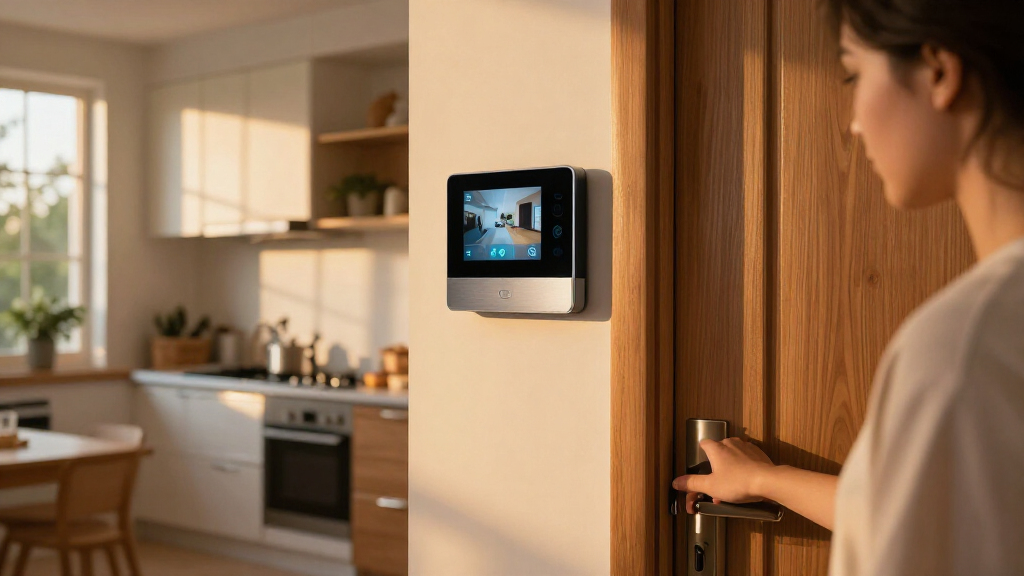
Choosing a smart home security system is less about picking the longest sensor list and more about deciding who should manage the work when something goes wrong. DIY systems let you choose, place, and configure equipment yourself; professionally installed systems add an expert setup and often bundle monitoring and support. Both can connect alarms, cameras, locks, and apps, but the service model changes the cost, the effort, and how much control you keep.

Get the latest gadgets delivered free with Prime
- Fast, free delivery on millions of items
- Prime Video, Amazon Music and more included
- Member-only deals all year

Ring Alarm 14-Piece Kit
- ✔ Kit contents: Base Station, 2 Keypads, 8 Contact Sensors, 2 Motion Detectors, Range Extender
- ✔ Recommended home size: 2–4 bedrooms
- ✔ Connectivity: Ethernet, Wi-Fi, Z-Wave, Bluetooth for setup; cellular backup with subscription

Ring Alarm 8-Piece Kit (2nd Gen) Home Security System
- ✔ Included components: Base station, keypad, 4 contact sensors, motion detector, range extender
- ✔ Recommended home size: 1–2 bedrooms
- ✔ Connectivity: Ethernet, Wi-Fi, Z-Wave, Bluetooth for setup
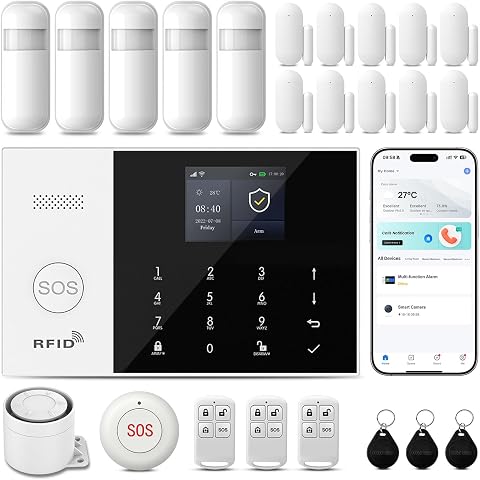
24-Piece Home Security Alarm System with Wi-Fi and 4G
- ✔ Unit count: 24 pieces
- ✔ Connectivity: 2.4 GHz Wi-Fi and 4G; switches to 4G if Wi-Fi is offline
- ✔ App compatibility: Smart Life, Tuya
DIY is usually the better fit for renters, confident app users, and households that want to add devices gradually or avoid a large service commitment. Professional installation makes more sense when a home has several entry points, the owner wants help designing coverage, or someone in the household would rather call for support than troubleshoot sensors. The central tradeoff is lower cost and flexibility against a more guided installation and service experience.
At a Glance
| Criteria | DIY smart home security systems | Professionally installed smart home security systems | Winner |
|---|---|---|---|
| Upfront cost | Often lower; buy only the equipment needed | Often higher due to installation and bundled equipment or service | A |
| Ongoing cost | Can be optional or less expensive, depending on the provider and plan | Frequently tied to a monitoring or service plan | A |
| Installation and setup | Self-installed and app-configured | A technician places and configures equipment | B |
| Customization and expansion | Usually easy to add compatible devices over time | Expansion may require compatible products or provider support | A |
| Monitoring and response | May offer self-monitoring, paid professional monitoring, or both | Typically built around a professional monitoring plan | B |
| Smart home integration | Broad device choices, but compatibility varies by brand | Can connect smart devices, with options shaped by the provider | A |
| Support and troubleshooting | Owner handles most setup and sensor troubleshooting | Provider support may help with installation and system issues | B |
Ring Alarm 14-Piece Kit
For buyers securing several rooms and entry points, the 14-piece kit gives the most complete starting coverage in this lineup. Eight contact sensors can cover more doors and windows before we need to expand, and two motion detectors add interior coverage. Ring describes it for two- to four-bedroom homes, which makes it a more natural fit for a family home than the 8-piece kit intended for one to two bedrooms.Its smart home appeal comes from app control, Alexa compatibility, and support for selected Z-Wave devices, including compatible smart locks. The second keypad can also give household members another physical place to arm or disarm the system. Compared with the 24-Piece system, Ring’s advantage is a stated path to compatible locks and sensors; the other system offers Google Assistant and automatic Wi-Fi-to-4G switching instead.The larger kit still has meaningful limits. Professional monitoring and cellular backup require a subscription, and the supplied details say some remote arming features also need a Ring Protect Plan. Buyers who want a system with all remote and backup functions available without ongoing service should examine those requirements first. The 14-piece bundle may also be more equipment than a small apartment needs. We rank it first for its balance of home-size coverage and smart-device expansion, not because it is the most universal choice.
Pros:
- Eight contact sensors and two motion detectors cover more areas from the start.
- Includes two keypads for convenient physical access in different parts of the home.
- Works with Alexa and a range of compatible smart locks and sensors.
- Includes a rechargeable base station battery backup rated for up to 24 hours.
Cons:
- Cellular backup and professional monitoring require a subscription.
- Some remote features, including remote arming, may require a compatible Ring plan.
- The larger kit can be excessive for a small home with few doors or windows to cover.
Best for: Households in two- to four-bedroom homes that want broad entry-point coverage, Alexa control, and room to add compatible smart devices.
Not ideal for: Small homes with few entry points, or buyers who want cellular backup and professional monitoring without a subscription.
Bottom line: We recommend this as the most balanced choice for a medium-sized home that needs substantial sensor coverage and Alexa-friendly expansion.
“We recommend this as the most balanced choice for a medium-sized home that needs substantial sensor coverage and Alexa-friendly expansion.”
Ring Alarm 8-Piece Kit (2nd Gen) Home Security System
When a larger bundle would leave sensors unused, the 8-piece Ring kit is the more proportionate starting point. Its four contact sensors, motion detector, keypad, base station, and range extender target one- to two-bedroom homes. That makes it easier to match the equipment to a smaller floor plan than the 14-piece version, which brings twice as many contact sensors and a second motion detector.We still get the practical smart features that make the larger Ring kit appealing: Ring app alerts and controls, Alexa compatibility, and an expansion path for additional Ring Alarm accessories. The kit’s base station has a rechargeable battery backup rated for up to 24 hours, and its keypad provides Home, Away, and Disarmed modes. If the household later adds rooms or entry points, extra sensors can extend coverage rather than forcing an immediate switch to a different system.The tradeoff is that the lower component count can become limiting quickly. Four contact sensors may not cover every accessible door and window, and additional sensors are sold separately. Like the 14-piece kit, this system’s cellular backup and professional monitoring depend on a compatible subscription; buyers should also check which remote features are included in their chosen plan. Compared with the 24-Piece system, Ring offers fewer stated assistant options but a clearer match for buyers already using Ring-compatible devices. We place it second because it is a sensible small-home choice, while the first-place bundle gives more complete coverage for a broader range of homes.
Pros:
- Includes the core components for a one- to two-bedroom setup.
- Ring app provides mobile alerts and system controls.
- Can expand with additional Ring Alarm sensors and accessories.
- Base station includes rechargeable battery backup rated for up to 24 hours.
Cons:
- Four contact sensors may not cover all entry points in some homes.
- Extra sensors and accessories are sold separately.
- Cellular backup and professional monitoring require a compatible subscription.
Best for: People in a one- or two-bedroom home who want a manageable Ring starter system with app alerts and the option to add sensors later.
Not ideal for: Larger households that need many doors and windows covered immediately, or buyers who require subscription-free cellular backup.
Bottom line: Choose this smaller Ring bundle when the four included contact sensors match your floor plan and you value the option to expand over time.
“Choose this smaller Ring bundle when the four included contact sensors match your floor plan and you value the option to expand over time.”
24-Piece Home Security Alarm System with Wi-Fi and 4G
This system’s defining difference is its automatic switch from 2.4 GHz Wi-Fi to 4G when Wi-Fi goes offline. For a buyer whose priority is keeping the alarm connected through a home internet interruption, that feature is more relevant than simply comparing the number of included pieces with Ring’s kits. It also supports Smart Life and Tuya app control, arming schedules, and Alexa and Google Assistant, giving it broader stated voice assistant coverage than either Ring option.The package adds an SOS device and remote control, which can trigger an alarm and app notification. Its listed 120 dB audible alarm and 100-meter maximum range help describe the system’s alerting and control reach, though buyers should consider their layout and placement when judging what those figures mean at home. Compared with the 8-piece Ring kit, this option offers more controls and a second connection route; compared with the 14-piece Ring kit, it does not list the same compatibility with specific smart locks and sensors.Those strengths come with questions to resolve before choosing it. It does not support 5G, and the supplied information says in-app SMS or phone alarms may incur third-party fees. The description does not specify a recommended home size or break down all 24 pieces, making it harder to judge coverage against a floor plan than with the Ring kits. Buyers should verify how the included sensors are distributed and what cellular service entails. We rank it third because the connectivity and SOS features are distinctive, while the Ring systems present clearer kit contents and sizing for buyers comparing coverage.
Pros:
- Switches to 4G if the 2.4 GHz Wi-Fi connection goes offline.
- Works with Smart Life or Tuya apps and supports Alexa and Google Assistant.
- Includes a remote and portable SOS device for alarm activation.
- Supports automatic arming schedules and event history.
Cons:
- Does not support 5G.
- In-app SMS or phone alarms may incur third-party fees.
- The supplied description does not detail the 24-piece sensor breakdown or recommended home size.
Best for: Smart home owners who want Wi-Fi-to-4G switching, scheduled arming, an SOS control, and compatibility with Alexa or Google Assistant.
Not ideal for: Buyers who need 5G support, clearly specified room-by-room sensor coverage, or a fully documented cost structure for phone and SMS alerts.
Bottom line: Consider this system when alternate connectivity and an SOS control matter more to you than a clearly documented sensor layout.
“Consider this system when alternate connectivity and an SOS control matter more to you than a clearly documented sensor layout.”
As an Amazon Associate we earn from qualifying purchases.
Key Differences
The most consequential difference is who takes responsibility for setup. A DIY buyer needs to decide where sensors belong, connect each device, test alerts, and maintain the system. That takes time, but the owner can change the layout, replace a device, or expand coverage without scheduling a visit. In a straightforward apartment or small home, the process may be manageable. In a larger home with multiple doors, outbuildings, or family members who need different access, getting coverage right can take more planning.
Professional installation shifts much of that planning to a technician and can reduce uncertainty for people who do not want to configure equipment themselves. The tradeoff is a higher total cost and often a closer relationship with the provider’s equipment, plan, and support process. It does not make every system automatically more secure: sensor placement, reliable internet and power, account settings, and household habits still matter. Buyers should compare what the actual plan includes, how cancellation works, and whether monitoring is optional before signing.
For value, DIY tends to win when the home is simple and the owner is willing to do the setup. Paying more for professional service can be worthwhile when hands-on help, guided coverage, or a bundled monitoring arrangement would otherwise be a barrier to using the system correctly. The right choice is the one the household will keep maintained and understand during an alert.
Detailed Comparison
Upfront cost (DIY smart home security systems wins — moderate)
DIY usually wins by a moderate margin because buyers can start with a hub and a few sensors, then add equipment as needed. Professional systems often include installation or bundled equipment costs, which can make the initial commitment higher. This matters most to renters, smaller households, and anyone uncertain about how much coverage they need. A low starting price is only useful if the chosen kit actually covers the doors and windows that matter.
Ongoing cost (DIY smart home security systems wins — moderate)
DIY has a moderate advantage when the owner is comfortable self-monitoring or finds an affordable monitoring plan. Professional systems commonly pair core service with recurring charges, though terms vary by provider. A monthly fee may be a sensible expense for someone who wants a monitoring center to receive alerts, but buyers should check required contract length, cancellation fees, and what functions stop if the plan ends.
Installation and setup (Professionally installed smart home security systems wins — major)
Professional installation wins by a major margin for households that want someone else to place and configure equipment. A technician can help plan sensor coverage and demonstrate the system, reducing setup work for the owner. DIY setup is more flexible but puts placement, pairing, and testing on the buyer. For a small, simple home this may be a short task; for a complex layout it can become a meaningful project.
Customization and expansion (DIY smart home security systems wins — moderate)
DIY wins by a moderate margin because owners can often begin with a small kit and add compatible devices without arranging a service visit. Professional systems may also expand, but the supported equipment range and process can depend on the provider. DIY flexibility is most useful for renters, people who move, or households whose needs change. Check device compatibility before buying: a broad catalog does not mean every camera, lock, or sensor works with every hub.
Monitoring and response (Professionally installed smart home security systems wins — moderate)
Professional systems win by a moderate margin for buyers who want a monitoring center involved in alarm events. DIY services may offer professional monitoring too, but some owners choose app alerts and handle contact themselves. That choice affects cost and responsibility: a self-monitored household needs someone reachable and able to act on notifications. Neither model guarantees emergency response, so review how alerts are verified, what the center can do, and whether service depends on power or internet.
Smart home integration (DIY smart home security systems wins — minor)
DIY has a minor advantage when the buyer values choice across brands and is willing to check compatibility. Some systems support a wider mix of locks, lights, cameras, and voice assistants, while provider-led setups can limit choices to an approved ecosystem. The practical winner depends on the devices already in the home. Before purchasing, verify that essential equipment works together and that important features do not require separate subscriptions.
Support and troubleshooting (Professionally installed smart home security systems wins — moderate)
Professional service wins by a moderate margin for owners who prefer guided help with equipment and installation questions. DIY users may have access to customer support, but they generally remain responsible for finding a misplaced sensor, fixing a network issue, or replacing a device. That is a tolerable trade for technically confident users; it can be a poor fit for someone who wants one provider to call when the system misbehaves.
DIY smart home security systems: Pros and Cons
Pros:
- Lower-cost entry and the ability to buy equipment in stages
- More control over device selection, placement, and changes
- Can suit renters or households that may move
Cons:
- Owner is responsible for installation, testing, and routine troubleshooting
- Self-monitoring requires someone to respond to alerts
- Compatibility and subscription requirements need careful checking
Professionally installed smart home security systems: Pros and Cons
Pros:
- Technician can help plan coverage and configure the system
- Professional monitoring is commonly central to the service
- Guided support can suit households that want less setup work
Cons:
- Higher upfront cost and often a recurring service charge
- Equipment choices and changes may depend on the provider
- Contracts and cancellation terms can reduce flexibility
Who Should Choose What
Choose DIY smart home security systems if:
- You want to minimize upfront spending and add devices gradually.
- You are comfortable installing sensors, testing alerts, and managing app settings.
- You rent, expect to move, or value control over your device mix.
Choose Professionally installed smart home security systems if:
- You want a technician to help choose sensor placement and set up equipment.
- You prefer professional monitoring and a provider to contact for system support.
- Your home has a complex layout and you value guided setup enough to pay more.
Skip both if: Neither model fits if you cannot reliably maintain the equipment or pay for monitoring you consider necessary; compare simpler monitored services or address connectivity and power reliability first.
Value for Money
DIY is generally the better value for people who can install and manage their own system. Lower equipment costs and optional service can keep total spending down, especially when coverage needs are modest. The savings come with time and responsibility: the owner must choose placement, test alerts, and decide who will respond.
Paying more for professional installation and monitoring is worthwhile when that service removes a real obstacle. A household that would otherwise leave equipment uninstalled or ignore configuration may get more practical value from a guided setup. Compare the total cost over the period you expect to use the system, including equipment, monthly monitoring, contract terms, and any charges for changes. If professional service adds little beyond a visit and a subscription you do not need, the premium is hard to justify.
Final Verdict
For most renters and capable hands-on buyers, choose a DIY smart home security system: it offers a lower-cost start, more choice, and easier expansion. Choose a professionally installed system if guided setup, technician support, and a monitoring service are worth the added cost to your household. The biggest deciding factor is whether you want to manage configuration and alerts yourself. Paying extra makes sense when professional help changes whether you will use the system reliably; otherwise, DIY is the stronger value.
Frequently Asked Questions
Are DIY smart home security systems less secure?
Not by definition. Security depends on suitable equipment, careful placement, reliable account settings, and how alerts are handled. A professionally installed system can help with placement, while a DIY owner has more responsibility for setup and upkeep.
Do DIY systems offer professional monitoring?
Many providers offer a paid monitoring option, while others support self-monitoring or a mix of plans. Check the specific plan’s response process, ongoing cost, and which features remain available without a subscription.
Is professional installation worth paying for?
It can be worth the premium if you want help planning coverage, need the system configured for a complex home, or prefer a provider to call for support. If you can install and test a small system yourself, the added cost may buy little that you need.
Which type is better for renters?
DIY is usually the more flexible fit because renters can often use portable equipment and take it when they move. Check lease restrictions, mounting methods, and the provider’s transfer or cancellation terms before buying.