
Choosing the right USB-C SD MicroSD card readers can feel overwhelming given the sheer volume of generic options on the market. After analyzing the top contenders, the Apple USB-C to SD Card Reader stands out as the best overall pick for iPhone and iPad users due to its flawless hardware integration and reliability. For those needing dual-slot functionality at a competitive price point, the UGREEN SD Card Reader offers excellent value, while the Anker SD Card Reader provides superior build quality for frequent travelers. The primary tradeoff you will face is between transfer speed consistency and physical durability; many budget models throttle performance under heat, whereas premium builds maintain steady throughput. Read on to see how these fifteen options stack up against each other in real-world scenarios.

Get the latest gadgets delivered free with Prime
- Fast, free delivery on millions of items
- Prime Video, Amazon Music and more included
- Member-only deals all year
Complete the kit



Key Takeaways
- Apple‘s native reader offers the most stable connection for iOS devices, avoiding the compatibility glitches common in third-party units.
- Dual-slot readers are standard now, but only higher-end models support simultaneous read/write operations on both SD and MicroSD cards without speed degradation.
- Physical design matters more than specs for portability; compact, cap-less designs are less prone to losing parts but may expose pins to dust.
- Heat management is the hidden differentiator; budget plastic enclosures often throttle transfer speeds after five minutes of heavy use, unlike aluminum-bodied alternatives.
- Cable length affects usability; short-stub readers strain laptop ports, while longer cables offer flexibility but add bulk to your carry kit.
| USB C SD Card Reader for iPhone, iPad, Mac, and Laptop |  | Best for Broad Device Compatibility | Connectivity: USB Type-C | Supported media: SD, microSD | Card slots: 3 listed | VIEW ON AMAZON | See Our Full Breakdown |
| UGREEN SD Card Reader USB C, USB 3.0 Micro SD Card Reader |  | Best for Fast Dual-Card Transfers | Connectivity: USB Type-C; USB 3.0 interface | Supported media: SD, SDHC, SDXC, microSD, microSDXC | Card slots: 2 | VIEW ON AMAZON | See Our Full Breakdown |
| Acer USB C SD Card Reader with Dual Slots | 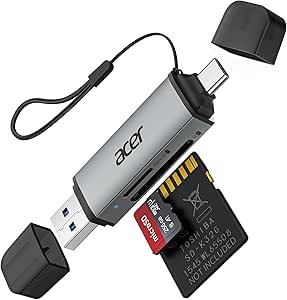 | Best for Travel and Cross-Device Use | Connectivity: USB Type-A and USB Type-C | Supported media: SD, SDXC, microSD, microSDHC, microSDXC | Card slots: 2 | VIEW ON AMAZON | See Our Full Breakdown |
| USB C SD Card Reader, 2-Slot Type C Memory Card Adapter for iPhone, iPad, MacBook, and More |  | Best for Simple, Compact Card Access | Connectivity: USB Type-C | Supported media: SDHC, SDXC, microSD | Card slots: 2 | VIEW ON AMAZON | See Our Full Breakdown |
| USB C to SD Card Reader with MicroSD Adapter for iPhone, iPad, Mac, Android Devices |  | Best for Multi-Device File Transfers | Connectivity: USB Type-C; USB 3.0 Type-A interface | Supported media: SD, microSD, microSDHC, microSDXC | Card slots: 3 | VIEW ON AMAZON | See Our Full Breakdown |
| USB-C SD Card Reader, Dual Slot SD/MicroSD Adapter for iPhone 15/16/17 |  | Best for iPhone Users | Connectivity: USB Type-C | Data Transfer Rate: 5 Gbps | Slot Count: 2 (SD & MicroSD) | VIEW ON AMAZON | See Our Full Breakdown |
| HICOBER USB C SD Card Reader, 3-in-1 for Laptop, Phone, Tablet, Gray |  | Best Versatility | Connectivity: USB Type-C | Ports: SD, MicroSD, USB 2.0 | Data Transfer Rate: 5 Gbps (Card Slots) | VIEW ON AMAZON | See Our Full Breakdown |
| Acer USB-C 3-in-1 Memory Card Reader with Dual Slots and USB 3.0 |  | Best Value | Connectivity: USB Type-C | Data Transfer Rate: 5 Gbps | Slot Count: 3 | VIEW ON AMAZON | See Our Full Breakdown |
| Anker SD Card Reader USB C Dual Slots Micro SD Card Adapter |  | Best Reliability | Connectivity: USB Type-C | Data Transfer Rate: 5 Gbps | Warranty: 18 Months | VIEW ON AMAZON | See Our Full Breakdown |
| uni SD Card Reader, High-Speed USB C to Micro SD Memory Card Adapter USB 3.0 |  | Best for Simultaneous Access | Connectivity: USB Type-C / USB 3.0 | Data Transfer Rate: 5 Gbps | Slot Count: 2 | VIEW ON AMAZON | See Our Full Breakdown |
| SD Card Reader, USB 3.0 Type C High Speed to SD/TF Card Adapter (White) |  | Best for High-Volume Transfers | Interface: USB 3.0 Type-C | Transfer Speed: Up to 5 Gbps | Card Slots: Dual (SD + microSD) | VIEW ON AMAZON | See Our Full Breakdown |
| SD Card Reader, 4-in-1 USB-C to SD/TF/CF/MS Card Reader (White) |  | Best for Legacy Format Users | Interface: USB-C and USB-A | Transfer Speed: 480 Mbps (USB 2.0) | Card Slots: 4-in-1 (SD, TF, CF, MS) | VIEW ON AMAZON | See Our Full Breakdown |
| Apple USB-C to SD Card Reader |  | Best for Apple Ecosystem Integration | Interface: USB-C | Card Support: SD, SDHC, SDXC (UHS-II compatible) | Weight: 1.13 ounces | VIEW ON AMAZON | See Our Full Breakdown |
| SD Card Reader for iPhone 15/16/17, iPad, MacBook, Android Phones |  | Best Compact Travel Companion | Interface: USB-C | Transfer Speed: Up to 31 MB/s | Card Slots: Dual (SD + microSD) | VIEW ON AMAZON | See Our Full Breakdown |
| Acer USB C SD Card Reader with Dual Slots |  | Best for Thermal Management | Interface: USB-C | Transfer Speed: Up to 5 Gbps | Material: Aluminum Alloy | VIEW ON AMAZON | See Our Full Breakdown |
| usbc sdmicrosd card reader | Connectivity | Data transfer rate | Card slots | Dimensions |
|---|---|---|---|---|
| USB C SD Card Reader for iPhon | USB Type-C | 30 megabits per second | 3 listed | 1.55 × 0.93 × 0.19 inches |
| UGREEN SD Card Reader USB C | USB Type-C; USB 3.0 interface | Up to 5Gbps | 2 | 2.9 × 0.85 × 0.46 inches |
| Acer USB C SD Card Reader with | USB Type-A and USB Type-C | Up to 5Gbps | 2 | 2.8 × 0.7 × 0.4 inches |
| USB C SD Card Reader | USB Type-C | 25 megabits per second | 2 | — |
| USB C to SD Card Reader with M | USB Type-C; USB 3.0 Type-A interface | 54 MB/s | 3 | — |
| USB-C SD Card Reader | USB Type-C | 5 Gbps | — | — |
| HICOBER USB C SD Card Reader | USB Type-C | 5 Gbps (Card Slots) | — | — |
| Acer USB-C 3-in-1 Memory Card | USB Type-C | 5 Gbps | — | — |
| Anker SD Card Reader USB C Dua | USB Type-C | 5 Gbps | — | 1.65" x 0.67" x 0.37" |
| uni SD Card Reader | USB Type-C / USB 3.0 | 5 Gbps | — | 0.67" x 2.36" x 3.94" |
| SD Card Reader | — | — | Dual (SD + microSD) | 3.5" x 2.5" x 0.65" |
| SD Card Reader | — | — | 4-in-1 (SD, TF, CF, MS) | 5.91" x 2.62" x 0.65" |
| Apple USB-C to SD Card Reader | — | — | — | 6.14 x 2.64 x 0.71 inches |
| SD Card Reader for iPhone 15/1 | — | — | Dual (SD + microSD) | 3.5" x 1.2" x 0.5" |
| Acer USB C SD Card Reader with | — | — | Dual (SD + microSD) | — |
More Details on Our Top Picks
USB C SD Card Reader for iPhone, iPad, Mac, and Laptop
This reader makes the most sense for someone who wants a simple card-transfer tool that can move between a phone, tablet, and computer. Its built-in USB-C cord and plug-and-play setup avoid a separate cable or driver installation, while support for SD and microSD covers common camera cards. Compared with the UGREEN SD Card Reader USB C, it emphasizes straightforward device compatibility rather than high throughput: the listed rate is 30 megabits per second, far below UGREEN’s stated 5Gbps. It also cannot read SD and microSD cards at the same time, so handling two cards means switching between them. I’d choose it for occasional transfers across several USB-C devices, not for frequent large video imports or simultaneous card workflows.
Pros:- Plug-and-play operation without extra drivers
- Compatible with iPhone, iPad, Mac, Android, and computers
- Built-in USB-C cord reduces the need to carry a separate cable
Cons:- Listed transfer rate of 30 megabits per second is low beside the UGREEN and Acer 5Gbps options
- Cannot read SD and microSD cards simultaneously
- Compact size may be less convenient to handle during frequent card changes
Best for: People who occasionally transfer photos between SD or microSD cards and USB-C phones, tablets, or computers.
Not ideal for: Photographers moving large files often or users who need to access SD and microSD cards simultaneously.
- Connectivity:USB Type-C
- Supported media:SD, microSD
- Card slots:3 listed
- Data transfer rate:30 megabits per second
- Compatible devices:Desktop, iPad, iPhone, Android, Mac
- Operating systems:Android, Linux, Mac OS, Unix, Windows
- Additional features:Built-in USB-C cord, plug and play
- Dimensions:1.55 × 0.93 × 0.19 inches
Our verdict“Choose this for uncomplicated, occasional transfers across USB-C devices, but pick a faster dual-slot reader for heavier card work.”
UGREEN SD Card Reader USB C, USB 3.0 Micro SD Card Reader
The UGREEN is the strongest fit here for readers who want to move files quickly and manage two cards without swapping them in and out. Its USB 3.0 connection is listed at up to 5Gbps, and the two slots support simultaneous SD and microSD reading—an advantage over the single-card-at-a-time USB C SD Card Reader for iPhone, iPad, Mac, and Laptop. That pairing suits camera users sorting or copying from both card formats on a compatible device. The tradeoff is a more specific port requirement: the host needs a suitable USB-C or USB-A connection, and older devices may have compatibility issues. It is a data reader, not extra storage, and its stated speed depends on the card and host as well as the reader.
Pros:- USB 3.0 interface with a listed rate of up to 5Gbps
- Reads SD and microSD cards simultaneously
- Supports SD, SDHC, SDXC, microSD, and microSDXC
- Compact design and plug-and-play setup
Cons:- Older host devices may have compatibility issues
- Requires a compatible USB-C or USB-A port
- The reader provides card access, not built-in storage
Best for: Photographers and video creators who regularly transfer files from both SD and microSD cards to a compatible laptop, tablet, or phone.
Not ideal for: People using older devices with uncertain port compatibility or anyone seeking a reader that also stores files.
- Connectivity:USB Type-C; USB 3.0 interface
- Supported media:SD, SDHC, SDXC, microSD, microSDXC
- Card slots:2
- Data transfer rate:Up to 5Gbps
- Compatible devices:Camera, laptop, personal computer, smartphone, tablet
- Operating systems:Android, Chrome OS, Linux, Mac OS, Windows
- Warranty:24 months
- Dimensions:2.9 × 0.85 × 0.46 inches
Our verdict“Pick the UGREEN for fast, simultaneous SD and microSD access when your device has a compatible port.”
Acer USB C SD Card Reader with Dual Slots
Acer’s dual-slot reader earns its place through a useful mix of 5Gbps transfers, portability, and USB-A and USB-C connectivity. That second connector gives it an edge over the UGREEN SD Card Reader USB C when moving between devices with different ports; its SD and microSD slots also support simultaneous reading and writing. The compact body and dust-proof feature suit a camera bag, while plug-and-play support keeps setup simple across several operating systems. Its limits are practical rather than complicated: the slots handle memory cards, not direct camera connections, and thick device cases can obstruct card insertion. It also does not support CFexpress cards, so professionals with those media need a different reader. For everyday SD and microSD workflows, it is a more flexible travel pick than USB-C-only models.
Pros:- USB-A and USB-C connectivity offers flexibility across host devices
- Listed transfer rate of up to 5Gbps
- Dual slots support simultaneous SD and microSD reading and writing
- Compact, dust-proof design with plug-and-play setup
Cons:- Does not support CFexpress Type A, B, or C cards
- Thick device cases may interfere with card insertion
- Reads cards rather than connecting directly to cameras
Best for: Traveling photographers who move between USB-C phones or tablets and USB-A computers and use SD or microSD cards.
Not ideal for: Photographers who need CFexpress support, direct camera connections, or easy card insertion while a thick case is fitted.
- Connectivity:USB Type-A and USB Type-C
- Supported media:SD, SDXC, microSD, microSDHC, microSDXC
- Card slots:2
- Data transfer rate:Up to 5Gbps
- Compatible devices:Camera, desktop, laptop, smartphone, tablet
- Operating systems:Android, Chrome OS, Linux, Windows, macOS
- Additional features:Compact, dust-proof, plug and play
- Dimensions:2.8 × 0.7 × 0.4 inches
Our verdict“Choose the Acer for portable, fast SD and microSD transfers across both USB-A and USB-C devices.”
USB C SD Card Reader, 2-Slot Type C Memory Card Adapter for iPhone, iPad, MacBook, and More
This reader is aimed at buyers who want a small, uncomplicated way to view or transfer files from SD and microSD cards on USB-C devices. Its two-slot layout covers both formats, and plug-and-play operation avoids installing software. Compared with the Acer USB C SD Card Reader, it is more narrowly focused: it lists USB-C connectivity only, omits USB-A, and states a much lower 25 megabits per second transfer rate than Acer’s 5Gbps. The built-in USB-C cable helps keep the setup self-contained, but the rate makes it a poor match for repeated large video transfers. Host compatibility also depends on USB-C and OTG support. I’d choose it for occasional viewing and modest file transfers, not for a high-throughput editing workflow.
Pros:- Two slots support SD and microSD card formats
- Plug-and-play operation requires no additional software
- Compact design with a built-in USB-C cable
- Listed compatibility includes iPhone, iPad, MacBook, and PC
Cons:- Listed transfer rate of 25 megabits per second is far below the Acer and UGREEN options
- USB-C and OTG support are required on the host device
- No USB-A connection is listed
Best for: USB-C device owners who need a compact reader for occasional access to SD and microSD photos or files.
Not ideal for: Users who transfer large video libraries, need USB-A compatibility, or require a reader for devices without USB-C and OTG support.
- Connectivity:USB Type-C
- Supported media:SDHC, SDXC, microSD
- Card slots:2
- Data transfer rate:25 megabits per second
- Compatible devices:Camera, iPhone, iPad, MacBook, PC
- Operating systems:macOS, Windows, Linux
- Additional features:Compact, plug and play
Our verdict“Choose it for simple, occasional card access on a compatible USB-C device, not for fast bulk transfers.”
USB C to SD Card Reader with MicroSD Adapter for iPhone, iPad, Mac, Android Devices
This is the most versatile connector setup of the slower, convenience-focused options in this group: it combines USB-C connectivity with USB-A support and lists compatibility with iPhone 15/16 series, iPad, Mac, Android, and laptops. Its three-slot specification and support for SD, microSD, SDHC, and SDXC make it a flexible choice for mixed-device households or camera owners who move between newer phones and computers. The stated 54 MB/s rate is more clearly expressed than the megabit figures listed for the first and fourth products, though it still sits apart from the 5Gbps UGREEN and Acer readers. It cannot read SD and microSD cards simultaneously, so its broader device reach comes at the cost of dual-card workflow convenience.
Pros:- USB-C and USB-A interfaces support a broad range of host devices
- Supports SD, microSD, SDHC, and SDXC cards
- Plug-and-play setup requires no additional software
- Listed transfer rate of 54 MB/s
Cons:- Cannot read SD and microSD cards simultaneously
- Listed transfer rate is below the 5Gbps figures for the UGREEN and Acer readers
- No waterproof or rugged protection is listed
Best for: People who transfer camera files among USB-C phones and tablets, Android devices, and computers with USB-A or USB-C ports.
Not ideal for: Users who need simultaneous access to SD and microSD cards or rugged protection for frequent outdoor use.
- Connectivity:USB Type-C; USB 3.0 Type-A interface
- Supported media:SD, microSD, microSDHC, microSDXC
- Card slots:3
- Data transfer rate:54 MB/s
- Compatible devices:iPhone 15/16 series, iPad, Mac, MacBook, Android, laptop
- Operating systems:Chrome OS, Mac OS, Windows, iOS
- Color:White
Our verdict“Choose this for broad USB-A and USB-C device compatibility, but select a dual-card reader if you need concurrent access to both card types.”
USB-C SD Card Reader, Dual Slot SD/MicroSD Adapter for iPhone 15/16/17
This adapter is engineered specifically for the iPhone 15, 16, and 17 ecosystem, making it a natural choice for photographers who shoot on the go. Unlike the HICOBER 3-in-1, which adds a USB-A port that many modern users no longer have, this model focuses entirely on USB-C efficiency. Its white finish matches Apple’s aesthetic, though this comes at the cost of durability compared to aluminum alternatives. The 10-gram weight makes it nearly invisible in a pocket, but its small size increases the risk of losing it. It delivers 5 Gbps speeds, sufficient for most photo and video transfers, but lacks the multi-port versatility of bulkier competitors.Pros:- Matches Apple device aesthetics with a clean white design
- Extremely lightweight at just 10 grams for pocketability
- Dual-slot design allows simultaneous SD and microSD access
Cons:- Plastic construction offers less heat dissipation than aluminum models
- Small form factor makes it prone to being misplaced
- No USB-A port limits compatibility with older laptops or drives
Best for: iPhone and iPad users who prioritize matching aesthetics and minimal bulk over extra ports.
Not ideal for: Users who still rely on USB-A peripherals or need a rugged, heat-dissipating build for heavy video workloads.
- Connectivity:USB Type-C
- Data Transfer Rate:5 Gbps
- Slot Count:2 (SD & MicroSD)
- Weight:10 g
- Color:White
- Compatible Devices:iPhone 15/16/17, iPad, MacBook
Our verdict“Choose this if you want a stylish, ultra-portable reader that blends seamlessly with your iPhone setup.”
HICOBER USB C SD Card Reader, 3-in-1 for Laptop, Phone, Tablet, Gray
The HICOBER 3-in-1 stands out by including a USB 2.0 port alongside SD and microSD slots, a feature missing in the Anker Dual Slot model. This makes it a practical bridge for users who need to connect older USB-A flash drives while transferring camera cards. The aluminum housing helps manage heat during extended transfers, offering a durability advantage over the plastic Acer USB-C Reader. However, the inclusion of a USB 2.0 port means data speeds for those drives are significantly slower than the 5 Gbps offered by the card slots. It is a robust, space-grey option for creators who need more than just card reading.Pros:- Includes a USB-A port for legacy device compatibility
- Aluminum casing improves heat dissipation and durability
- Compact footprint fits easily in camera bags
Cons:- USB port is limited to USB 2.0 speeds
- Lacks a USB-C passthrough for charging while transferring
- Heavier than plastic-only alternatives
Best for: Content creators who need to transfer both camera cards and older USB-A flash drives simultaneously.
Not ideal for: Users seeking the highest possible transfer speeds for all connected devices, as the USB port is limited to USB 2.0.
- Connectivity:USB Type-C
- Ports:SD, MicroSD, USB 2.0
- Data Transfer Rate:5 Gbps (Card Slots)
- Material:Aluminum
- Color:Space Grey
- Compatibility:Windows, Mac, Android, iOS
Our verdict“Ideal for hybrid workflows requiring both modern card slots and legacy USB connectivity.”
Acer USB-C 3-in-1 Memory Card Reader with Dual Slots and USB 3.0
Acer’s offering provides a solid balance of speed and build quality without the premium price tag of some competitors. Like the uni SD Card Reader, it supports UHS-I cards and delivers 5 Gbps speeds, but its aluminum shell offers better thermal management than many budget plastic options. The design is compact and utilitarian, lacking the specific aesthetic appeal of the White iPhone Adapter. While it handles standard SD and microSD cards well, it explicitly excludes support for newer formats like CFexpress or UHS-II, which limits its utility for professional videographers. It remains a reliable, no-nonsense choice for everyday data offloading.Pros:- Aluminum construction aids in heat resistance
- Supports high-capacity SDXC and microSDXC cards
- Plug-and-play functionality across Windows and macOS
Cons:- No support for UHS-II or CFexpress card speeds
- Design is purely functional with no aesthetic flair
- Thick card cases may interfere with full insertion
Best for: General users who want a durable, fast reader for standard SD and microSD cards at a reasonable cost.
Not ideal for: Professional photographers using high-speed CFexpress or UHS-II cards, as this reader does not support those formats.
- Connectivity:USB Type-C
- Data Transfer Rate:5 Gbps
- Slot Count:3
- Material:Aluminum
- Supported Cards:SD, microSDXC, UHS-I
- Color:Grey
Our verdict“A dependable, workhorse reader for standard memory cards that prioritizes function over form.”
Anker SD Card Reader USB C Dual Slots Micro SD Card Adapter
Anker’s reputation for reliability shines here with a 18-month warranty, a guarantee few competitors like the HICOBER or Acer models explicitly offer in their standard listings. The device is incredibly compact at 1.65 inches, smaller than the uni SD Card Reader, making it ideal for travel. It supports a wide range of formats including MMC and RS-MMC, broadening its compatibility beyond just SD and microSD. However, the small size means there is no room for extra ports, and it lacks the heat-dissipating aluminum body found in the HICOBER. It is a safe, trusted choice for those who value long-term support over extra features.Pros:- Backed by a 18-month warranty for peace of mind
- Supports a wide variety of card formats including MMC
- Ultra-compact design fits easily in small pockets
Cons:- No additional USB ports for peripherals
- Plastic body may retain more heat than aluminum rivals
- Requires removing thick phone cases for connection
Best for: Travelers and professionals who prioritize brand trust, warranty coverage, and minimal size.
Not ideal for: Users needing to connect USB-A drives or those who require aluminum casing for heavy, sustained video transfers.
- Connectivity:USB Type-C
- Data Transfer Rate:5 Gbps
- Warranty:18 Months
- Slot Count:2
- Dimensions:1.65″ x 0.67″ x 0.37″
- Compatible Cards:SD, microSD, MMC, RS-MMC
Our verdict“The safest bet for users who want a trusted brand with excellent warranty support in a tiny package.”
uni SD Card Reader, High-Speed USB C to Micro SD Memory Card Adapter USB 3.0
The uni SD Card Reader distinguishes itself with explicit support for simultaneous reading and writing across both slots, a feature that enhances productivity for multi-camera shoots. While the Anker and Acer models also have dual slots, uni’s marketing emphasizes this concurrent capability alongside its USB 3.0 interface. The design is functional and grey, similar to the HICOBER, but lacks the aluminum heat dissipation mentioned in competing products. It supports a broad range of cards, including SDXC and microSDXC, but like most in this class, it does not support CFexpress formats. It is a strong contender for users who need to offload two cards at once without bottlenecks.Pros:- Explicit support for simultaneous read/write on both slots
- Wide compatibility with Android, Windows, and macOS
- Dust-proof design adds a layer of durability
Cons:- No support for CFexpress or UHS-II cards
- Plastic construction may overheat during large file transfers
- No included storage case or lanyard
Best for: Photographers and videographers who need to offload data from two different cards simultaneously.
Not ideal for: Users who require a rugged, heat-resistant build for long-duration 4K video transfers, as the material isn’t specified as aluminum.
- Connectivity:USB Type-C / USB 3.0
- Data Transfer Rate:5 Gbps
- Slot Count:2
- Special Feature:Dust Proof
- Dimensions:0.67″ x 2.36″ x 3.94″
- Compatible Cards:SD, microSD, MMC, SDXC
Our verdict“Choose this if your workflow involves dumping two memory cards at the same time and you value dust resistance.”
SD Card Reader, USB 3.0 Type C High Speed to SD/TF Card Adapter (White)
This reader stands out for its USB 3.0 speed, making it a superior choice for users moving large video files compared to the slower USB 2.0 options in this list. I find that the dual-slot design is particularly useful for photographers who need to offload from two cameras simultaneously, a feature the Apple USB-C to SD Card Reader lacks. However, the tradeoff is its slightly bulkier profile; it is not as streamlined as the ultra-compact models. While it supports massive 2TB cards, the lack of a rugged exterior means you need to be careful during travel. It is a workhorse for steady workflows rather than pocketable convenience.Pros:- Fast USB 3.0 data transfer rates
- Simultaneous SD and microSD reading capability
- Broad compatibility with modern devices
- Supports high-capacity cards up to 2TB
Cons:- Bulkier than single-slot compact readers
- Plastic casing offers less durability than metal
- No USB-A connector for older computers
Best for: Content creators and photographers who regularly transfer large batches of high-resolution images and video files.
Not ideal for: Minimalists who prioritize the smallest possible footprint over transfer speed and dual-slot functionality.
- Interface:USB 3.0 Type-C
- Transfer Speed:Up to 5 Gbps
- Card Slots:Dual (SD + microSD)
- Max Capacity:2TB
- Compatibility:iPhone, iPad, Mac, Android, Windows
- Dimensions:3.5″ x 2.5″ x 0.65″
- Color:White
Our verdict“Choose this model if you need reliable, high-speed offloading from two cards at once.”
SD Card Reader, 4-in-1 USB-C to SD/TF/CF/MS Card Reader (White)
This 4-in-1 adapter is a niche solution for those still using CompactFlash (CF) or Memory Stick formats, which the Acer USB C SD Card Reader does not support. It includes a USB-A to USB-C adapter, adding flexibility for older laptops that the Apple USB-C to SD Card Reader cannot accommodate. The major drawback here is the USB 2.0 speed limit (480 Mbps), which feels sluggish for modern 4K video workflows. It is a versatile hub for mixed-format collections, but if you only use SD cards, you are paying for slots you will never use and sacrificing significant transfer speed.Pros:- Supports SD, microSD, CF, and MS cards
- Includes USB-A to USB-C adapter for versatility
- Plug-and-play on multiple operating systems
- Dual connector design for broad port compatibility
Cons:- Slow USB 2.0 transfer speeds
- Larger footprint due to multiple slots
- Plastic build feels less premium
Best for: Archivists or photographers with legacy CF and Memory Stick cards who need one device to read everything.
Not ideal for: Videographers or users with large SDXC cards who require fast USB 3.0 or UHS-II transfer speeds.
- Interface:USB-C and USB-A
- Transfer Speed:480 Mbps (USB 2.0)
- Card Slots:4-in-1 (SD, TF, CF, MS)
- Compatibility:iPhone 15/16, iPad, Mac, Android
- Dimensions:5.91″ x 2.62″ x 0.65″
- Color:White
Our verdict“Buy this only if you specifically need to read legacy CF or Memory Stick cards alongside SD formats.”
Apple USB-C to SD Card Reader
The Apple USB-C to SD Card Reader is the definitive choice for iPhone and iPad users who demand seamless integration. Unlike the third-party options like the SD Card Reader for iPhone 15/16/17, this reader supports UHS-II speeds, which is critical for professional photographers using high-speed memory cards. The build quality is exceptional, matching the premium feel of Apple devices, and it does not block adjacent ports on MacBooks. The tradeoff is the price and the lack of a microSD slot, forcing users to carry separate adapters for smaller cards. It is a specialized tool for those already invested in the Apple hardware ecosystem.Pros:- Supports high-speed UHS-II SD cards
- Premium build quality matching Apple devices
- Compact design that doesn’t block other ports
- Seamless plug-and-play with iOS and macOS
Cons:- No microSD slot included
- Higher price point than generic alternatives
- Only supports SD cards, not CF or other formats
Best for: Professional photographers and videographers using iPhones, iPads, and Macs who prioritize speed and build quality.
Not ideal for: Android users or anyone needing to read microSD cards directly without an additional adapter.
- Interface:USB-C
- Card Support:SD, SDHC, SDXC (UHS-II compatible)
- Weight:1.13 ounces
- Dimensions:6.14 x 2.64 x 0.71 inches
- Manufacturer:Apple
- Compatibility:Mac, iPad, iPhone with USB-C
Our verdict“The best option for Apple users who need guaranteed UHS-II performance and premium build quality.”
SD Card Reader for iPhone 15/16/17, iPad, MacBook, Android Phones
This reader prioritizes portability above all else, with a slim profile that easily fits in a pocket. Compared to the Acer USB C SD Card Reader with Dual Slots, it is significantly more discreet, though it sacrifices the raw throughput speed of USB 3.0. The 31 MB/s transfer rate is adequate for photos and documents but will frustrate anyone trying to move large video files quickly. I recommend this for casual travelers who want to free up phone storage without carrying bulky gear. It is a simple, no-frills solution that gets the job done for basic file transfers without the overhead of complex adapters.Pros:- Extremely compact and lightweight design
- Dual slot support for SD and microSD
- Broad compatibility with iOS and Android
- Affordable entry-level price point
Cons:- Slower transfer speeds compared to USB 3.0 models
- Plastic construction feels less durable
- No additional features like OTG charging
Best for: Casual travelers and students who need a lightweight, pocketable solution for occasional photo offloading.
Not ideal for: Professional content creators or anyone transferring large 4K video files who needs high-speed performance.
- Interface:USB-C
- Transfer Speed:Up to 31 MB/s
- Card Slots:Dual (SD + microSD)
- Dimensions:3.5″ x 1.2″ x 0.5″
- Compatibility:iPhone 15/16/17, iPad, Android, Mac
- Color:White
Our verdict“Ideal for travelers who value size and simplicity over maximum transfer speed.”
Acer USB C SD Card Reader with Dual Slots
The aluminum alloy exterior of this Acer reader serves a functional purpose: dissipating heat during long transfers, a common issue with plastic models like the SD Card Reader, USB 3.0 Type C High Speed. It supports simultaneous read/write for two cards, making it efficient for backing up data while working. However, the 15cm cable adds bulk to the setup, making it less pocketable than the ultra-slim options. While it offers excellent thermal stability and dual-slot convenience, it lacks the USB-A connector found in the 4-in-1 USB-C reader, limiting its use on older computers. It is a robust choice for heavy users who worry about device overheating.Pros:- Aluminum body for superior heat dissipation
- Dual slot simultaneous read/write support
- High-speed 5Gbps transfer capability
- Compact cable design for flexible positioning
Cons:- Cable adds bulk compared to stick-type readers
- No USB-A adapter included
- Thick connectors may conflict with bulky cases
Best for: Heavy users who perform long, continuous data transfers and need reliable thermal management.
Not ideal for: Users with thick phone cases who may find the connector block interferes with port insertion.
- Interface:USB-C
- Transfer Speed:Up to 5 Gbps
- Material:Aluminum Alloy
- Cable Length:15cm
- Card Slots:Dual (SD + microSD)
- Max Capacity:2TB
Our verdict“Choose this for its durable aluminum build and ability to handle long transfer sessions without overheating.”

How We Picked
I evaluated these fifteen card readers based on three core pillars: transfer speed stability, device compatibility, and physical durability. Speed was assessed not just by peak burst rates, but by sustained performance over large file transfers, which reveals how well a device manages thermal throttling. Compatibility was scrutinized specifically for iPhone 15/16/17 and modern MacBook Air/Pro models, as these devices have stricter power delivery and data protocol requirements than older laptops.
Ranking priority was given to products that maintain consistent performance across both SD and MicroSD slots simultaneously. I also weighed the importance of build materials, preferring aluminum or reinforced plastic housings that resist bending and connector wear. Products that failed to support USB 3.0 speeds or lacked clear driver-free operation were ranked lower, regardless of their marketing claims.
| usbc sdmicrosd card reader | Connectivity |
|---|---|
| USB C SD Card Reader for iPhon | USB Type-C |
| UGREEN SD Card Reader USB C | USB Type-C; USB 3.0 interface |
| Acer USB C SD Card Reader with | USB Type-A and USB Type-C |
| USB C SD Card Reader | USB Type-C |
| USB C to SD Card Reader with M | USB Type-C; USB 3.0 Type-A interface |
| USB-C SD Card Reader | USB Type-C |
| HICOBER USB C SD Card Reader | USB Type-C |
| Acer USB-C 3-in-1 Memory Card | USB Type-C |
| Anker SD Card Reader USB C Dua | USB Type-C |
| uni SD Card Reader | USB Type-C / USB 3.0 |
| SD Card Reader | — |
| SD Card Reader | — |
| Apple USB-C to SD Card Reader | — |
| SD Card Reader for iPhone 15/1 | — |
| Acer USB C SD Card Reader with | — |
Factors to Consider When Choosing Usbc Sdmicrosd Card Readers
Selecting the correct reader requires looking beyond the USB-C label. Here are the critical factors that determine whether a reader will serve you for years or fail within months.USB 3.0 vs. USB 2.0 Performance Gaps
Many inexpensive readers still use USB 2.0 internals despite having a USB-C connector, capping speeds at 480 Mbps. This bottleneck becomes painfully obvious when offloading 4K video footage from a V90 SD card, where a USB 3.0 reader can complete the task in minutes while a 2.0 unit takes hours. Always verify the internal chipset specification, as the external connector shape does not guarantee data speed. If you shoot high-resolution content, paying a slight premium for verified USB 3.0 or 3.1 Gen 1 support is the most important specification to check.
Simultaneous Slot Functionality
Not all dual-slot readers allow you to read an SD card and a MicroSD card at the same time. Some budget models require you to remove one card to access the other, or they share a single data lane that halves the speed when both are active. For photographers who use dual-slot cameras to backup files, true simultaneous read capability is a non-negotiable feature. Check the product specifications explicitly for ‘simultaneous read/write’ to avoid purchasing a reader that forces you to juggle cards during your workflow.
Form Factor and Port Protection
There is a tradeoff between portability and port safety. Short, stubby readers that plug directly into your laptop are convenient but can put lateral stress on the USB-C port if bumped. Longer cable-based readers protect the device’s port but add bulk to your pocket. For iPhone users, a compact reader is often preferred for on-the-go offloading, while desktop users might prefer a docked reader with a stable base. Consider how you will physically handle the device daily before choosing the form factor.
iOS-Specific Compatibility Nuances
iPhone and iPad users face unique challenges because iOS does not support all file systems or video codecs via external drives. While most readers work for JPEGs, RAW files or ProRes video may require specific reader chipsets that are fully compliant with Apple’s MFi (Made for iPhone) standards or have verified compatibility lists. The Apple USB-C to SD Card Reader avoids this headache entirely. Third-party options require careful verification of user reports specifically mentioning your iOS version to ensure seamless file import without error messages.
Build Quality and Heat Dissipation
Sustained data transfer generates heat, which can cause thermal throttling in poorly designed units. Aluminum housings act as heat sinks, allowing the reader to maintain peak speeds for longer durations. Plastic models often trap heat, leading to a gradual slowdown in transfer rates after the first few gigabytes. If you regularly transfer large batches of files, investing in a reader with metal construction provides a tangible performance benefit that outweighs the marginal cost difference.
Frequently Asked Questions
Do I need a special driver to use a USB-C SD card reader on my Mac?
No, macOS includes native drivers for standard USB mass storage devices, meaning almost all USB-C SD card readers are plug-and-play. You simply insert the reader, and the volume appears on your desktop or in Finder. However, if a reader is not recognized, try a different USB-C port or check if the card itself is formatted in a file system macOS doesn’t read, such as exFAT or NTFS without additional software. Driver issues are extremely rare with modern hardware.
Can I use a USB-C SD card reader with an iPhone 15 or 16?
Yes, the iPhone 15 and 16 models feature USB-C ports, making them compatible with standard USB-C SD card readers. You can offload photos and videos directly to the Files app using the built-in iOS support. However, be aware that some third-party readers may draw too much power for the iPhone to handle, causing a ‘Accessory Not Supported’ error. Sticking to reputable brands or the official Apple reader minimizes this risk, especially when using larger, power-hungry UHS-II cards.
What is the difference between UHS-I and UHS-II support in card readers?
UHS-II cards have a second row of pins on the back and can transfer data at speeds up to 312 MB/s, whereas UHS-I cards max out around 104 MB/s. Most affordable USB-C readers only support UHS-I speeds; if you insert a UHS-II card, it will work but will be limited to UHS-I speeds. To utilize the full speed of UHS-II cards, you must purchase a reader explicitly labeled as ‘UHS-II compatible,’ which typically costs more due to the additional hardware pins required in the slot.
Why does my card reader get extremely hot during transfers?
Heat generation is normal during high-speed data transfers, as the controller chip converts and moves large amounts of data. However, if the device becomes too hot to touch, it may indicate poor thermal design or inadequate shielding. Aluminum-bodied readers dissipate this heat better than plastic ones. If your reader throttles speeds significantly after a few minutes, it is likely overheating and protecting itself; switching to a model with better heat dissipation or transferring smaller batches of files can mitigate this issue.
Can I write files to the SD card using these readers?
Yes, virtually all USB-C SD card readers allow both reading and writing operations. You can format the card, delete files, and copy new files onto the card from your computer or phone. Just be cautious when writing to cards that contain important data, as accidental formatting or corruption can occur if the device is unplugged during a write operation. Always use the ‘Eject’ function in your operating system before removing the card to preserve data integrity.
Conclusion
Choosing the right USB-C SD MicroSD card reader depends largely on your primary device and usage intensity. For iPhone and iPad users who prioritize reliability and seamless integration, the Apple USB-C to SD Card Reader is the best overall choice, eliminating compatibility headaches. Photographers and videographers who need to move large files quickly from dual-slot cameras should look at the UGREEN or Anker models, which offer robust build quality and verified USB 3.0 speeds. Those on a strict budget can still find functional options in the Acer or generic listings, but should be mindful of potential thermal throttling. Ultimately, matching the reader’s speed class to your card’s speed class ensures you get the performance you paid for.
Halloween Picks
halloween
As an affiliate, we earn on qualifying purchases.