To get the best results with drone RAW DNG photos, start by calibrating your sensor data to guarantee accurate colors and exposure. Begin your edits with basic adjustments like white balance and contrast, then refine hues and saturation for the desired look. Use RAW’s unprocessed data for detailed recovery of shadows and highlights, and apply creative color grading to set the mood. Continuing with these steps will reveal how precise calibration and creative techniques improve your drone footage.
Open a free Amazon Business account
Business pricing, bulk buying and tax-exempt orders.
As an affiliate, we earn on qualifying purchases.
Key Takeaways
- Calibrate your drone camera sensors accurately to ensure true color and exposure in DNG files.
- Start editing RAW files with white balance and exposure adjustments before applying creative grades.
- Use RAW data to recover shadows and highlights, maintaining maximum dynamic range for flexible editing.
- Apply consistent calibration and grading workflows tailored to your drone and camera setup for professional results.
- Leverage the unprocessed RAW data for subtle, precise color grading and enhancement to achieve cinematic effects.
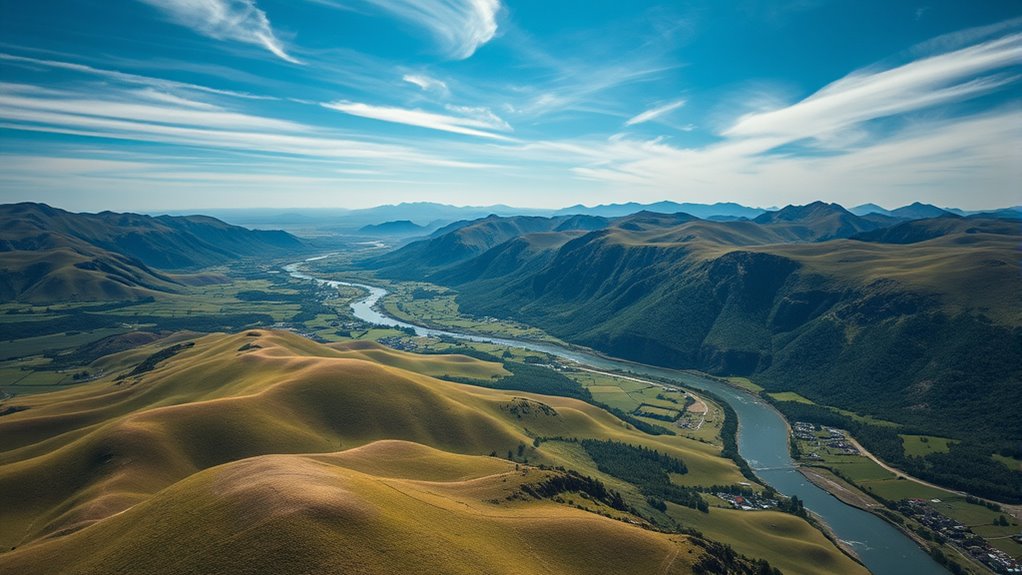
Flying a drone often captures stunning footage in RAW format, giving you the flexibility to enhance your images later. When working with these DNG files, one of the most critical steps is sensor calibration. Accurate sensor calibration ensures that your camera’s sensor data is correctly interpreted, which greatly impacts the quality of your final image. Before diving into editing, make sure your drone’s camera is properly calibrated, as this reduces noise, corrects color inconsistencies, and provides a solid foundation for your post-processing work. Proper calibration means your RAW files will contain accurate color and exposure information, making tasks like color grading much more effective and predictable.
Proper drone sensor calibration ensures accurate colors and exposure, laying a strong foundation for stunning, professional-grade RAW footage.
Once you’re confident that your sensor is calibrated, you can begin your editing process. RAW files provide a vast dynamic range, but to reveal their full potential, you need to perform careful adjustments. This is where color grading becomes vital. Rather than simply correcting exposure or contrast, color grading allows you to craft a specific mood or style, transforming flat, unprocessed footage into vibrant, cinematic images. Since RAW files retain all original data, you have the flexibility to push shadows, recover highlights, and fine-tune color tones without sacrificing image quality. Be deliberate with your adjustments—small, precise changes will yield better results than overdoing it.
Using professional editing software, start with basic corrections like adjusting white balance and exposure to set a neutral baseline. From there, focus on refining contrast and clarity, which help bring out details in the landscape or subject. As you progress, utilize color grading tools to enhance the hues, saturation, and overall tone. Keep in mind that subtle shifts in color balance can dramatically alter the mood of your footage, so experiment with different looks until you achieve the desired effect. Because RAW files contain unprocessed data, you won’t need to worry about degrading image quality with your edits, allowing you to be more aggressive in your grading if needed.
It’s also important to remember that each drone and camera setup may require different calibration and grading techniques. Take the time to develop a workflow that suits your drone’s sensor characteristics and the style you’re aiming for. The key to getting the most out of your RAW files is understanding the technical aspects—like sensor calibration—and mastering creative tools such as color grading. Additionally, understanding the sensor calibration process can help you troubleshoot issues and ensure your workflow remains consistent across different projects. When combined, these steps enable you to turn raw footage into stunning, professional-quality images that truly stand out.

EVEO Screen Cleaner Spray - Large Screen Cleaner Bottle - TV Screen Cleaner, Computer Screen Cleaner, for Laptop, Phone, Ipad - Computer Cleaning kit Electronic Cleaner (1 Pack)
- Versatile Electronic Screen Cleaner: Suitable for TVs, laptops, phones, and tablets
- Effective Streak-Free Cleaning: Removes dust, fingerprints, and smudges
- Gentle on Sensitive Screens: Safe for LCD, LED, OLED, CRT screens
As an affiliate, we earn on qualifying purchases.
Frequently Asked Questions
Can I Convert Drone RAW Files to JPEG Without Quality Loss?
Yes, you can convert drone RAW files to JPEG without quality loss by using proper raw conversion software. When you perform the raw conversion, you control image settings like exposure and contrast, avoiding unnecessary image compression. This process guarantees you maintain the highest quality during the conversion. Just be sure to choose lossless settings and avoid excessive compression, so your JPEGs stay true to the original RAW data.
What Software Is Best for Editing Drone DNG Files?
You should use Adobe Lightroom or Adobe Camera Raw for editing drone DNG files because they offer excellent file compatibility and advanced tools for precise color correction. These programs let you fine-tune exposure, contrast, and colors while preserving image quality. Plus, they support raw formats directly, ensuring you get the best results without sacrificing detail or clarity. Your drone photos will look their best with these powerful editing options.
How Do I Reduce Noise in Drone RAW Images?
To reduce noise in your drone raw images, start by applying noise reduction techniques in your editing software. Use sliders for luminance and color noise to fine-tune results. Additionally, guarantee your drone’s sensor calibration is accurate, as it helps minimize noise during capture. Combining proper sensor calibration with effective noise reduction techniques will give you cleaner, sharper images, enhancing overall photo quality and detail.
Are There Specific Settings for Drone RAW Processing?
Think of your drone’s raw processing like tuning a fine instrument. You should start with proper sensor calibration to guarantee accurate data capture. Then, adjust white balance settings to match the scene’s lighting. Set your camera to ideal raw processing parameters, like sharpening and noise reduction, to bring out the best details. These specific settings help you access the full potential of your drone’s raw files for stunning, professional-quality images.
How Can I Maximize Detail Retention During Editing?
To maximize detail retention during editing, guarantee your drone’s sensor calibration is accurate before shooting. Use a high dynamic range setting to capture more detail in shadows and highlights. When editing, avoid over-sharpening, which can cause detail loss, and adjust contrast carefully to preserve subtle textures. Balancing these factors helps retain maximum detail, making your DNG photos look sharper and more vibrant without sacrificing image quality.

iO CLEAN (16oz - 473ml Screen Cleaner Spray – Best Large Cleaning Kit
- Versatile Screen Compatibility: Works on all electronic screens and devices
- Gentle, Scratch-Free Formula: Removes dust and grime without scratching
- Protective, Anti-Static Coating: Leaves a streak-free, smudge-free shine
As an affiliate, we earn on qualifying purchases.
Conclusion
By mastering how to edit your drone RAW files, you reveal stunning detail and vibrant colors in your photos. Did you know that RAW files retain up to 50% more image data than JPEGs? This gives you incredible flexibility during editing, helping you achieve professional-quality results. So, take the time to refine your DNG photos—your aerial shots will stand out with sharper details and richer tones, making every flight truly worth it.
Labor Day sales Picks
labor day deals
As an affiliate, we earn on qualifying purchases.