
🔍 Read the full analysis: 10 Best AI Mini PCs For Private, Local Workloads In 2026 on ThorstenMeyerAI.com

Get the latest gadgets delivered free — and shop member deals
- Fast, free delivery on millions of items
- Access to Prime Big Deal Days deals on October 6–7
- Prime Video, Amazon Music and more included
TL;DR
This 2026 roundup compares 10 AI mini PCs by processor, installed memory, storage and expansion options. The GEEKOM A9 Max is the source’s best-balanced pick, while the GMKtec EVO-X3 offers 128GB of memory and the GMKtec K15 with Oculink provides an external graphics option. The source supplies specifications and buying guidance, not independent benchmarks.
ThorstenMeyerAI.com has published the original 10-PC comparison for people considering local AI workloads, naming the GEEKOM A9 Max its best-balanced pick based on the listed Ryzen AI 9 HX 470, 32GB of DDR5 memory and 2TB SSD. The roundup also identifies the GMKtec EVO-X3 for its 128GB of memory and a GMKtec K15 configuration for its Oculink connection, while noting that specifications alone do not establish real-world AI performance.
The comparison weighs processor class, memory capacity and type, storage and expansion options. Its top overall choice is the A9 Max because its supplied configuration combines a high-tier processor with 32GB of DDR5 and a 2TB drive. That makes it a relatively ready-to-use package among the listed systems, according to the source; the ranking is an editorial assessment rather than a result from disclosed benchmark testing.
The GMKtec EVO-X3 is positioned for memory-heavy work with 128GB of LPDDR5X. The roundup says this capacity may suit tasks involving larger models or datasets held in memory, but it does not establish which specific models will run or how quickly. Several other featured premium processor configurations, including the GEEKOM GT15 Max, GEEKOM IT15 and MINISFORUM AI X1 Pro, are listed with 32GB of RAM.
The two listed GMKtec K15 configurations make different tradeoffs; the GMKtec NucBox lineup offers other models to compare. The NucBox K15 has a 1TB SSD, while the K15 with Oculink has a 512GB SSD and an option for an external graphics setup. Buyers comparing them need to weigh included storage against plans for graphics expansion and any added hardware that would require.
The 10 picks
- 1
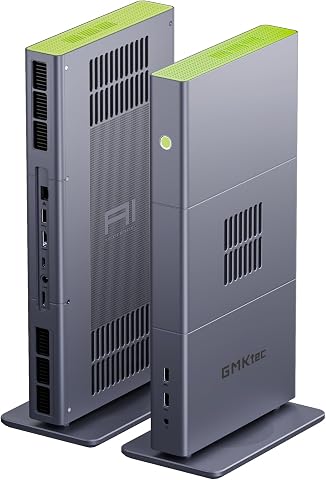 GMKtec EVO-X3 Mini PC with AMD Ryzen AI Max+ 395, 128GB LPDDR5X, and 2TB PCIe…View on Amazon →
 - 2
 GMKtec EVO-X2 AI Mini PC AMD Ryzen AI Max+ 395, Up to 5.1GHz, 16C/32TView on Amazon →
 - 3
 GEEKOM A9 Max Top AI Mini PC, AMD Ryzen AI9 HX470, 32GB DDR5, 2TB SSDView on Amazon →
 - 4
 GEEKOM IT15 Mini PC with Intel Ultra 9 285H, 32GB DDR5, 1TB SSD, Arc 140T GPU…View on Amazon →
 - 5
 MINISFORUM AI X1 Pro-370 Mini PC with AMD Ryzen AI 9 HX370, 32GB DDR5, 1TB SS…View on Amazon →
 - 6
 GEEKOM GT15 Max Business & Professional Mini PC with Intel Core Ultra 9, 32GB…View on Amazon →
 - 7
 GEEKOM IT13 MAX AI Mini PC with Intel Ultra 9 185H, 24GB LPDDR5, 500GB SSDView on Amazon →
 - 8
 Glorlin Mini PC with AMD Ryzen 7 Pro 8845HS, 16GB DDR5 RAM, and 1TB SSDView on Amazon →
 - 9
 GMKtec K15 AI Mini PC Oculink Intel Ultra 5 125U 32GB DDR5 512GB SSD, Desktop…View on Amazon →
 - 10
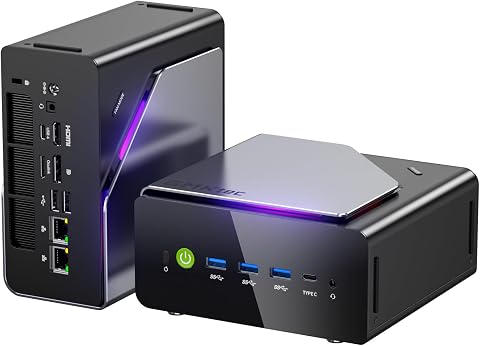 GMKtec K15 Mini PC AI Ultra 5 125U, 12-Core, 32GB DDR5, 1TB PCIe 4.0 SSDView on Amazon →
Memory and Expansion Shape Local AI
For local AI, a model or dataset must fit within the system’s available memory before processor branding can make a difference. Memory capacity and type can therefore narrow the workloads a compact PC can handle, while storage determines how much software, models and project data can remain on the device. The 128GB EVO-X3 has a distinct listed advantage in capacity, but that figure alone does not show performance or software compatibility.
Expansion choices also affect the total setup. Oculink may allow external graphics on a supported system, but using that route involves extra equipment, space and configuration. The source does not provide enclosure compatibility details, costs or measured gains. Readers should treat the roundup as a way to compare configurations and questions to investigate, rather than proof that one machine will outperform another on their specific workload.
How the Ten Picks Were Compared
The supplied article says it ranked systems around factors that can change practical use: processor, installed memory, memory type, storage and expansion. It gave priority to a balanced configuration, then highlighted models serving particular needs, such as unusually high memory or Oculink support. It advises buyers to match capacity to the expected workload instead of assuming that a higher processor tier automatically makes a better local AI computer.
The source does not include independent benchmark results, cooling measurements or verified compatibility tests. It also cautions that memory may not be replaceable in some compact PCs, so buyers should check whether a specific model allows upgrades before purchase. No complete item-by-item specifications for all 10 PCs are included in the supplied material, so this article names only the configurations it documents.
“The GEEKOM A9 Max is my best overall pick”
— ThorstenMeyerAI.com
Performance Evidence Is Limited
The supplied source does not report independent AI benchmarks, sustained performance or cooling behavior for these PCs. It also does not show which model sizes or applications each configuration can run, whether particular AI accelerators are supported by a buyer’s software, or whether memory and storage are upgradeable on every model. The stated rankings and suitability descriptions should be read as the site’s assessment of listed specifications, not as verified outcomes for every workload.
For the Oculink K15, the material does not identify tested graphics enclosures, cards, power requirements or the cost of a complete external setup. The roundup also provides no publication date beyond its 2026 framing. Those details could affect both comparisons and buying decisions.
Check Configurations Before Buying
Readers should verify the exact configuration offered by a seller, including memory capacity and type, SSD size, upgrade options and ports. For a planned local AI workload, check software requirements and memory needs, then look for independent results using the same applications and models. Anyone considering Oculink should confirm that the intended enclosure and graphics hardware work with the chosen PC and account for the additional equipment.
The source gives no announced follow-up tests or next milestone. More complete comparisons would need current prices, full specifications and measured results across defined workloads before readers could judge relative speed or value.
Key Questions
Which mini PC does the roundup choose as its best overall pick?
It names the GEEKOM A9 Max, citing its Ryzen AI 9 HX 470, 32GB of DDR5 and 2TB SSD as a balanced listed configuration.
Which listed PC has the most memory?
The GMKtec EVO-X3 is listed with 128GB of LPDDR5X. The source does not provide benchmarks showing how that capacity affects particular AI workloads.
What is the difference between the two GMKtec K15 configurations?
The NucBox K15 is listed with a 1TB SSD. The K15 with Oculink is listed with a 512GB SSD and adds a connection intended to support external graphics setups.
Does the roundup prove which PC runs AI models fastest?
No. The supplied material compares specifications and editorial fit but does not include independent workload benchmarks, cooling measurements or verified software compatibility results.
Source: ThorstenMeyerAI.com
Fall Picks
fall essentials
As an affiliate, we earn on qualifying purchases.